
Pareto Order Limit vs Madgic Order Limits: Which App Is Right for You?
Imagine you launch a limited sale. Within minutes, a handful of buyers grab everything. Regular customers show up and find nothing left. That’s the problem Pareto Order Limit vs Madgic Order Limits are built to solve. Both apps let you control how much a customer can buy. But they work differently – and choosing the wrong one can leave real gaps in your store’s protection. This guide breaks down both apps in plain terms so you can pick the right one fast.
Why Shopify Doesn’t Handle Order Limits By Default
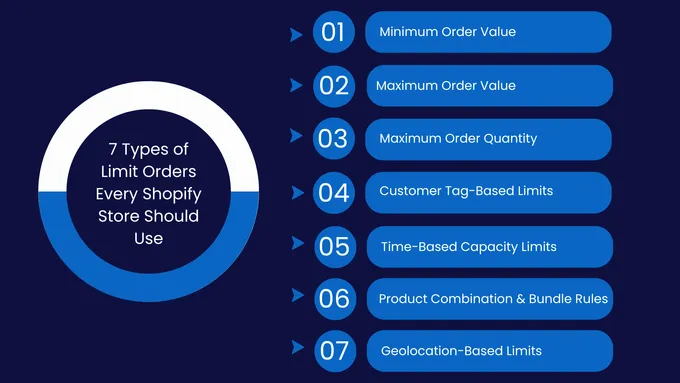
Shopify tracks your inventory. But it doesn’t let you set rules like:
- “Each customer can only buy 2 of this item”
- “Orders must be at least 6 units”
- “No one can buy more than $500 worth of product in one order”
Without an app, nothing is stopping a buyer from adding 100 items to their cart and checking out.
- The tricky part is where the limit gets enforced. There are three layers:
- Layer 1 – Product page: A warning shows before someone adds to cart. Easy to ignore.
- Layer 2 – Cart page: A message appears when someone breaks a rule in their cart. Can be bypassed by going directly to checkout.
- Layer 3 – Checkout: The order actually gets blocked. This is the strongest layer – and the one that matters most.
Here’s the catch: some shoppers skip the cart entirely. They use Shop Pay, PayPal, or Apple Pay, which go straight from the product page to checkout. If your limit only works on the cart page, those buyers slip through.
The only way to stop that is server-side checkout validation. Think of it as a final check that happens before the order is confirmed – no matter how the customer got there.
One more thing: showing a custom alert inside the checkout steps (like on the payment page) requires Shopify Plus. On a standard Shopify plan, customers see a standard error message instead. Both apps still block the order – the experience just looks different.
Understand What Each App Is Built For
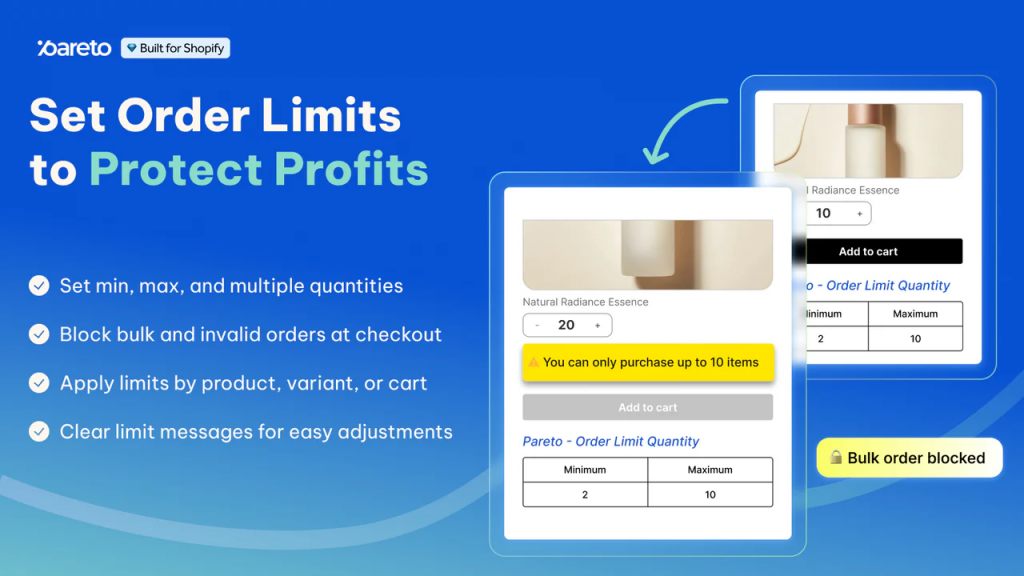
Pareto Order Limits Quantity is for stores that need detailed, flexible rules. You can limit by quantity, order value, or weight. You can apply different rules by product, collection, customer type, country, or even time of day. It also connects with Shopify Flow, so you can automate what happens when someone breaks a rule.
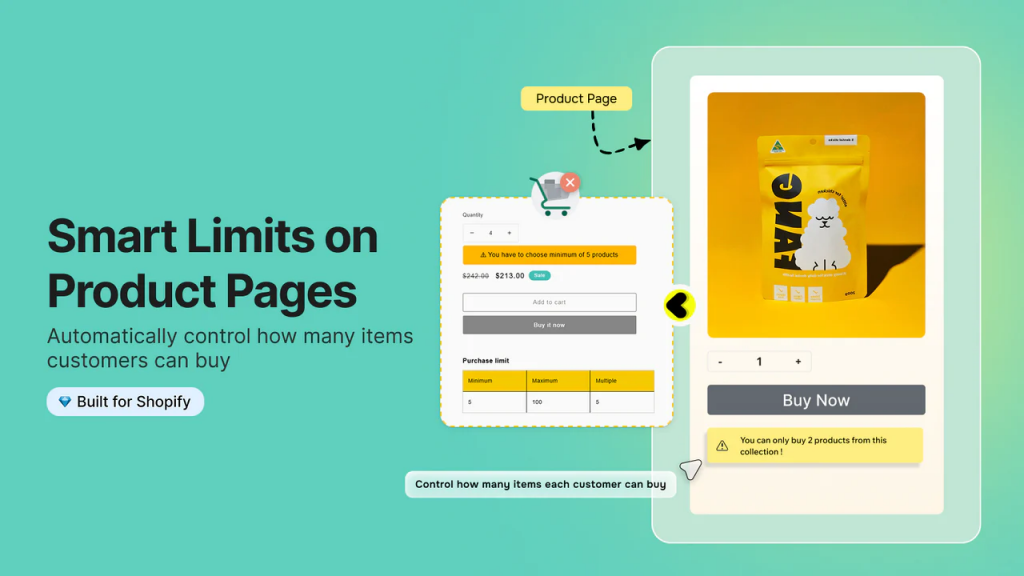
Madgic Order Limits Quantity is for stores that want something simple and fast. You set a minimum or maximum quantity, pick which products it applies to, and you’re done. The setup is clean and the rule builder is easy to use.
Both apps carry the Built for Shopify badge, meaning they meet Shopify’s quality and performance standards. Both have free plans and a 7-day free trial on paid tiers.
Pareto Order Limit vs Madgic Order Limits: Feature Comparison
When picking between two apps that solve the same problem, the details matter. Both Pareto and Madgic cover the basics – min and max quantity limits, product and collection rules, cart caps, and checkout alerts. But once you get past those shared features, the two apps go in different directions. Pareto leans toward flexibility and control. Madgic leans toward simplicity and speed. The table below shows exactly where they line up and where they split apart.
| Feature | Pareto | Madgic |
|---|---|---|
| Min/max quantity limits | ✅ | ✅ |
| Order value limits | ✅ | ✅ (in store’s default currency only) |
| Weight-based limits | ✅ | Not confirmed |
| Limit per product or variant | ✅ | ✅ |
| Limit per collection | ✅ | ✅ |
| Cart-level cap (all items total) | ✅ | ✅ |
| Limit by customer tag or segment | ✅ | Partial |
| Limit by country or market | ✅ | Not confirmed |
| Schedule rules (start/end dates) | ✅ | Not confirmed |
| Block specific product combinations | ✅ | Partial |
| Require a product before buying another | ✅ | Partial |
| Low stock counter | ✅ | Not confirmed |
| Checkout alerts (Shopify Plus) | ✅ | ✅ |
| Cart and product page alerts | ✅ | ✅ |
| Pop-up alerts | Not confirmed | ✅ |
| Auto-translate messages | ✅ (paid plans) | Not confirmed |
| Shopify Flow integration | ✅ | ❌ |
| Order statistics and abuse tracking | ✅ | Not confirmed |
| App Store rating | 4.7 / 5 (114 reviews) | 4.9 / 5 (126 reviews) |
Where Each App Falls Short
No app is perfect. Before you install either one, it helps to know the weak spots.
Pareto’s limitations:
- More features mean more setup time. If you just want a simple limit, the extra options can feel like a lot.
- Checkout UI alerts inside the checkout steps are only available on Shopify Plus. On standard plans, customers see a plain validation error – not a custom-branded message.
Madgic’s limitations:
- Order value limits are based on your store’s default currency. Multi-currency stores have to do manual conversions.
- One user reported that a free plan update temporarily broke their rules. The developer said it was an oversight and fixed it – but it’s worth knowing.
- Less publicly documented for advanced use cases. If you need to know exactly how a specific feature works, you may need to ask for support.
Neither of these is a dealbreaker on its own. But knowing them ahead of time helps you test the right things before going live.
Limit Types: Quantity, Value, and Weight
Both apps let you set a minimum and maximum quantity. This covers most situations – limiting bulk buyers, setting a minimum order for wholesale, and capping purchases during a sale.
Pareto adds two more limit types that Madgic doesn’t clearly support:
- Order value limits – For example, “minimum order of $50.” Useful if you want customers to spend a certain amount before checking out.
- Weight limits – For example, “maximum 20kg per order.” Useful if your shipping costs are tied to weight.
Pareto also lets you limit how many orders a single customer can place per day – not just per order. That’s a useful tool for stopping repeat purchases that get around a per-order cap.
The Rule Builder: Simple vs. Advanced
This is where the two apps feel most different.
Madgic keeps things simple. You pick a rule type (min or max quantity), choose which products it applies to, set the number, and save. It takes a few minutes. For most stores, that’s all they need.
Pareto is still simple, but it gives you more options. On top of standard min/max rules, you can:
- Block product combinations – Stop customers from buying two specific products together
- Require a dependency – Force customers to include Product A before they can buy Product B
- Schedule a rule – Turn a limit on automatically at the start of a sale and off when it ends
- Target by market or country – Set different limits for customers in different regions
- Target by customer type – Apply rules only to wholesale buyers, retail customers, or a specific tag group
These features sound advanced, but they solve real problems. If you run Black Friday sales, manage wholesale accounts alongside retail, or sell in multiple countries, you’ll use these options.
Multi-Currency Stores: A Key Difference
If your store sells in more than one currency, pay close attention here.
Pareto supports market and country targeting. You can apply different rules to different regions. A customer in Germany can have a different limit than a customer in the US.
Madgic supports multi-currency stores, but there’s a catch confirmed by actual user reviews: order value limits are set in your store’s default currency. If your store defaults to USD and a customer checks out in GBP, Madgic applies the USD limit – not the GBP equivalent. You have to manually figure out the conversion and configure it yourself.
For stores with one main currency, this is a minor inconvenience. For stores actively selling across multiple currencies, it’s a meaningful limitation.
Shopify App Integration: Automation After a Violation
This is a feature only Pareto has, and it’s worth explaining clearly.
Shopify Flow is Shopify’s built-in automation tool. It lets you build workflows: “When X happens, do Y automatically.”
Pareto connects to Flow with two triggers:
- Cart limit violated – Fires when a customer’s cart breaks one of your rules
- Order limit bypassed – Fires when someone manages to complete an order despite a rule violation
With these triggers, you can automatically:
- Tag the customer’s account
- Send an internal alert to your team
- Add the order to a review queue
- Flag the IP address
Without this, you’d have to check manually. For busy stores or stores dealing with frequent abuse, this automation saves real time. Madgic doesn’t connect to Shopify Flow.
Order Statistics
Pareto has a Statistics page that shows you:
- How many orders were blocked
- Which rules triggered the most
- Which products were targeted most often
- Which IP addresses showed up repeatedly
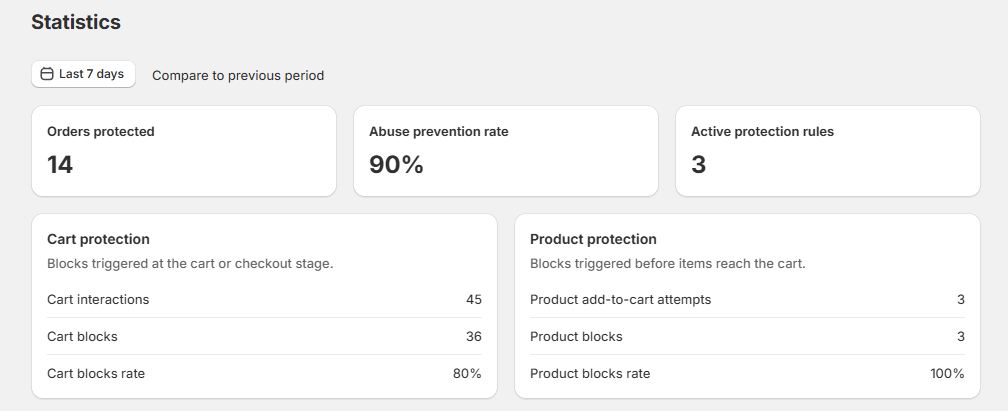
This data is useful in two ways. First, it tells you whether your rules are actually working. Second, it helps you spot patterns – like a specific reseller IP or a product that keeps getting bulk-purchased.
Madgic doesn’t appear to offer this kind of tracking based on its public listing and documentation.
Pricing: Pareto Order Limit vs Madgic Order Limits
Pricing is similar at the entry level. Pareto has more tiers for larger stores.
One heads-up: Pareto’s App Store listing and help center have shown slightly different prices at times. Always check the Shopify App Store listing directly before subscribing – for both apps. Prices can change, and the App Store is the billing source.
The free plans are real. You can set up a rule, test it on your store, and see how it works – before spending anything.
| Plan | Pareto | Madgic |
| Free | 1 active rule, 100 blocked actions | Limited number of rules |
| Entry paid plan | ~$8.99/month | $8.99/month |
| Mid-tier plan | ~$19.99/month | – |
| Shopify Plus plan | ~$29.99/month | – |
| Free trial on paid plans | 7 days | 7 days |
How to Pick the Right App
Run through these questions:
- Do you only need basic min/max limits? Either app works. Madgic is quicker to set up.
- Do you sell in multiple countries with different rules per region? Go with Pareto. It handles this natively.
- Do you run scheduled sales or limited-time promotions? Pareto’s rule scheduling saves you from manually toggling rules on and off.
- Do you want automation after a rule violation? Only Pareto connects with Shopify Flow.
- Are you on Shopify Plus? Both apps offer more at the Plus level, especially for checkout customization. Pareto documents the Plus features clearly.
- Do you have simple needs and a tight budget? Madgic’s Standard plan at $8.99/month covers unlimited rules. It’s a clean, affordable setup.
- Are you dealing with frequent reseller or scalper abuse? Pareto’s statistics and Flow integration make it the stronger choice for ongoing monitoring.
Pareto Order Limit vs Madgic Order Limits FAQs
Do these apps actually block the order, or just show a warning?
Both block the order at checkout. The order won’t go through if a rule is broken – no matter how the customer got there.
What happens if a customer uses Shop Pay or Apple Pay?
Both apps catch these, too. Express checkouts skip the cart, but the order still gets blocked at checkout. Test your setup before a big sale to be sure.
Do I need Shopify Plus to use these apps?
No. Both work on standard Shopify plans. Shopify Plus just unlocks custom-branded alerts inside the checkout steps – without it, customers see a plain error message instead.
Can I set limits per customer – not just per order?
With Pareto, yes. You can target by customer tag (e.g., “wholesale” vs. retail). Madgic can restrict products to logged-in users only, but per-customer targeting isn’t clearly documented.
What if my store sells in euros and pounds?
Madgic’s value limits use your store’s default currency only – no auto-conversion. You have to calculate and enter the equivalent amount manually. Pareto handles this better with market and country targeting.
Can I run a rule only during a sale period?
Pareto, yes – it has a built-in scheduler. Madgic doesn’t, so you’d have to turn the rule on and off manually.
What if someone bypasses the rule and the order goes through anyway?
Pareto connects to Shopify Flow, so you can trigger an automatic alert or tag the order when a bypass happens. Madgic doesn’t have this – you’d need to catch it manually.
Bottom Line
Whether you go with Pareto Order Limit or Madgic Order Limits, you’re making a solid choice for protecting your store.
Madgic is a great starting point if you just need simple limits – set a purchase cap, add a minimum order quantity, and you’re good to go. Pareto is worth the extra setup if your store is growing or your rules are getting more complex – different limits by country, customer type, or sale window, plus automation and tracking to back it up. Whichever you pick, take 10 minutes to test your rules before launch. Express checkouts like Shop Pay can behave differently than a regular cart – better to find that out in testing than on sale day.