
How to Add Shopify You May Also Like Section?
Shopify You May Also Like feature is one of the simplest ways to increase sales on your online store. 48% of social media users say they’ve made an impulse purchase after seeing a product recommended in their feed, turning unplanned browsing into unexpected orders. This guide will show you exactly how to add You May Also Like sections to your Shopify store using both built-in features and third-party apps.
What Is the Shopify You May Also Like Section?
The Shopify You May Also Like is a section that shows customers other products they might want to buy. It usually appears on product pages, displaying items that are similar to or work well with what the customer is viewing.
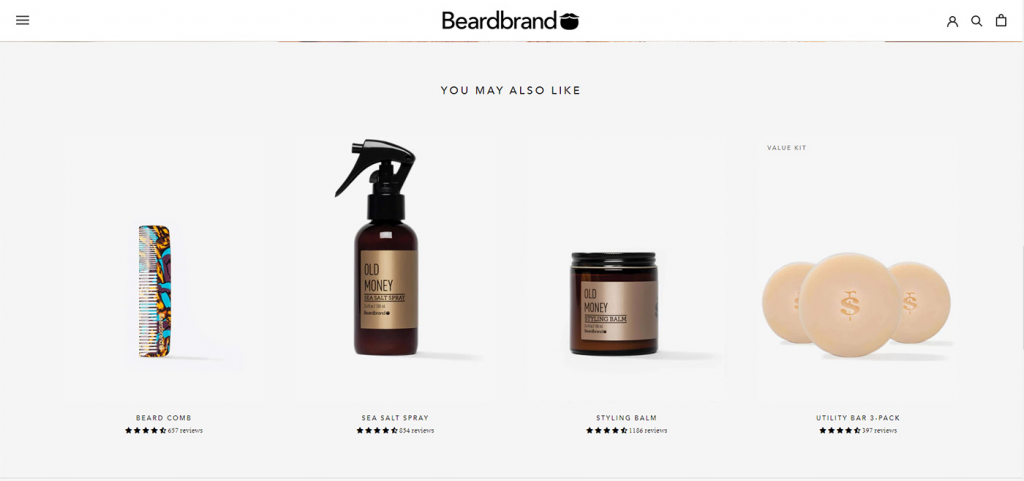
This feature works through cross-selling and upselling. If someone is looking at a t-shirt, they might see other t-shirts or matching accessories. If they’re viewing a camera, they might see lenses or tripods that work with it.
Shopify’s system looks at three main factors to pick related product recommendations:
- Purchase history – products that customers historically bought together
- Product description – products with similar descriptions
- Related collections – products from the same collections as the current item
Source: Shopify Dev Docs.
Where Can The Shopify You May Also Like Appear?
While product pages are the most common spot, you can show recommendations in several places:
- Product Pages: The classic spot – usually at the bottom of the page, with a title like “You May Also Like” or “Related Products”
- Cart Page: Show add-on items before checkout to increase order value
- Pop-ups: After someone clicks “Add to Cart,” show a pop-up with related items they can add with one click
- Checkout Pages: Last-chance recommendations during the buying process
- Thank You Pages: Suggest items for future purchases after someone completes an order
What Is The Benefit Of Shopify You May Also Like Section?
Shopify’s “You May Also Like” section works as a built-in product recommendation feature, helping stores increase sales and improve the shopping experience through personalized suggestions. Here are the main benefits businesses can expect:
Increase average order value (AOV)
Related product recommendations encourage customers to add more items to their cart, especially complementary or alternative products. This helps increase average order value and overall revenue from a single purchase session.
Boost sales and conversion rates
Well-optimized recommendation sections can increase sales by encouraging multi-item purchases. Since the suggested products are relevant to what shoppers are already viewing, they can also improve conversion rates by helping users quickly find products they are interested in.
Improve customer experience and engagement
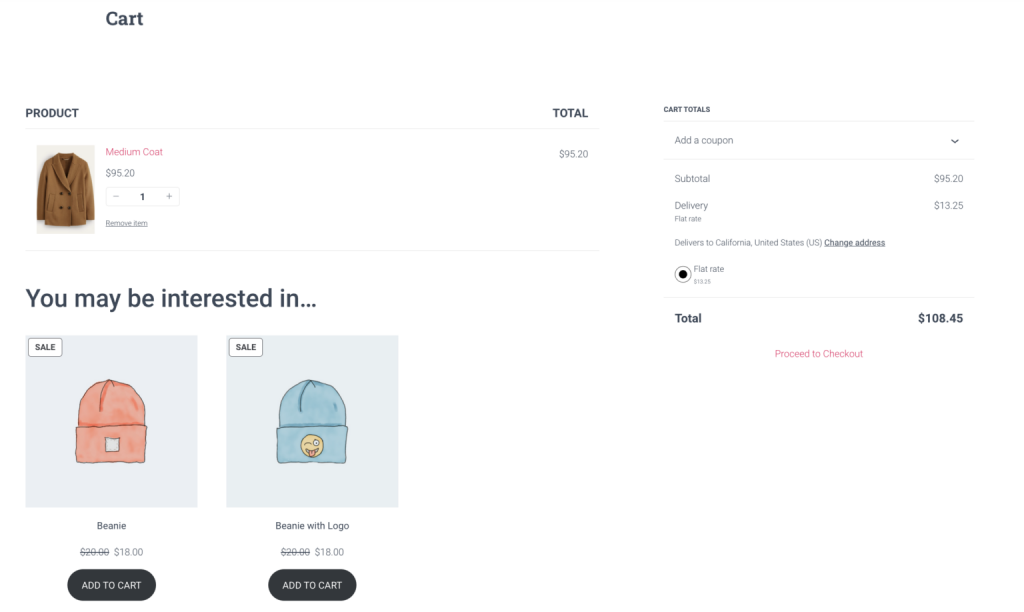
“You May Also Like” acts like a mini personal shopping assistant by showing products related to a customer’s interests and browsing behavior. This creates a more personalized shopping experience and keeps users engaged longer on the site.
Enhance product discovery
The feature helps customers discover products they may not have found through normal browsing or search. This is especially useful for stores with large catalogs, where many products can easily go unnoticed.
Support customer retention and loyalty
Showing personalized and relevant recommendations can make customers feel better understood, leading to higher satisfaction and stronger loyalty. Over time, this increases the chances of repeat purchases and long-term customer retention.
How To Add You May Also Like on Shopify Using Shopify’s Native Theme Editor? (Free Way)
Most modern Shopify themes come with product recommendations built right in. This means you can add a “You May Also Like” section without installing any apps or paying extra fees.
Step 1: Open Your Theme Editor
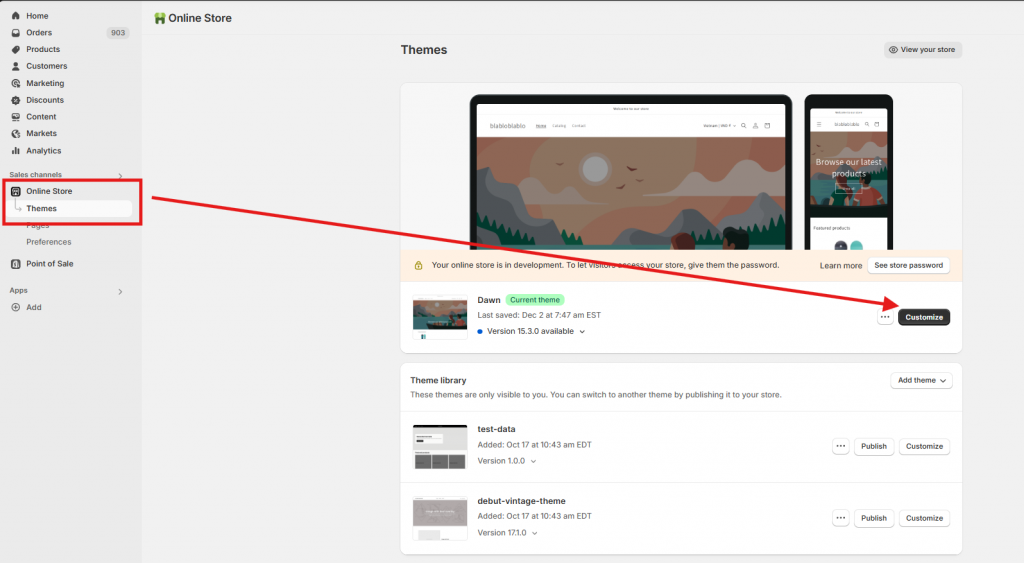
- Go to Online Store > Themes in your Shopify admin
- Find your current theme and click “Customize” button
- At the top of the editor, switch to “Product” or “Default product” page
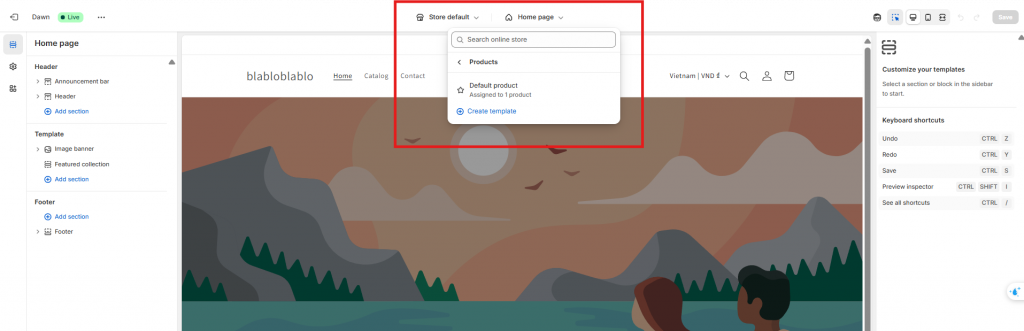
Step 2: Add the Recommendations Section
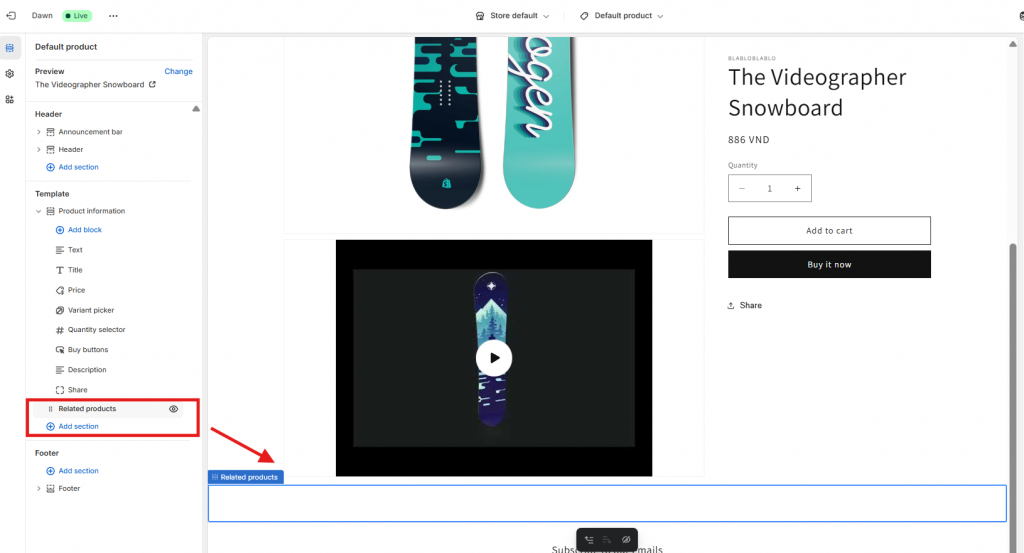
- In the left sidebar, look for “Add section”
- Find “Related products,” “Product recommendations” or similar
- Click to add it to your product page
Step 3: Customize the Settings
- Change the heading text to “You May Also Like” or whatever fits your brand
- Set how many products to show (usually 4-8 works well)
- Adjust the layout if your theme allows it
Step 4: Save and Test
- Click “Save” in the theme editor
- Visit a product page on your store to see the new section
- Check that it’s showing relevant products
How To Add You May Also Like on Shopify Using Pareto? (Smart Way)
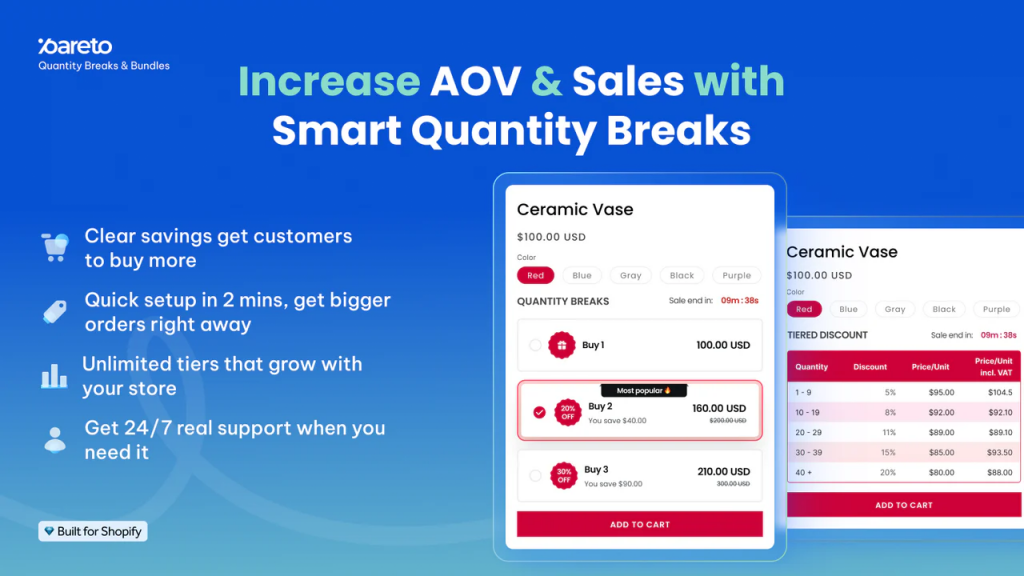
If you’re looking to go beyond static product suggestions and drive real sales action, Pareto: Quantity Breaks & Discounts is a powerful and surprisingly flexible tool that does more than just offer volume pricing. It now includes smart product suggestion features that act very much like dynamic “You May Also Like” triggers – but with conversion-focused intent.
Here’s how Pareto supports and amplifies your “You May Also Like” strategy:
✅ Pop-up Product Suggestions
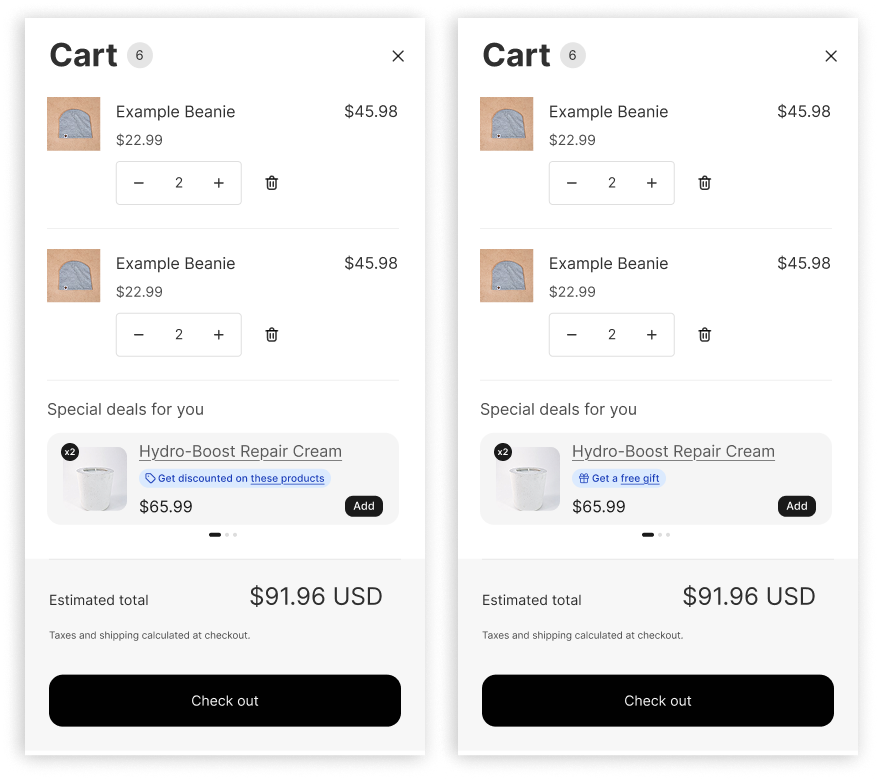
When a shopper adds an item to their cart, Pareto can display a pop-up suggesting complementary or relevant products that would qualify the shopper for a higher discount tier. This nudges them to add more while they’re already in a buying mindset – a frictionless upsell opportunity.
✅ Product Add-ons
Using the Product Add-on feature, you can highlight add-on items related to the customer’s cart (think: accessories, bundles, or related SKUs) at a discounted price. This is a great way to show “You May Also Like” items with an extra incentive built in.
✅ Cart Notices That Encourage “Buying More”
Pareto allows you to place messaging directly in the cart, reminding customers that they’re just one item away from unlocking a better deal – and it can even suggest products to help them get there. It’s like a goal-based “You May Also Like” mechanic that creates urgency and value.
✅ Upsells on Post-Purchase and Thank-You Pages
Why stop at the checkout? Pareto supports upsell and cross-sell recommendations after purchase, so you can continue offering smart, relevant products even after the initial sale. It’s a perfect opportunity to boost lifetime value.
For example:
- Imagine your customer sees a “You May Also Like” section suggesting a T-shirt in three colors.
- With Pareto active, they’ll also see bulk discounts like:
- Buy 2, get 10% off
- Buy 3 or more, save 20%
- Get 5+ for 30% off
These incentives are displayed directly on the product page, using clean, customizable discount tables that integrate beautifully with most Shopify themes. You definitely should use Pareto, because:
✅ Increase Average Order Value (AOV): Turn browsers into bulk buyers by offering tiered pricing on individual SKUs.
✅ Easy Setup: No coding needed. Just install, choose your discount rules, and go.
✅ Perfect Complement to Upsells: When your “You May Also Like” section sparks interest, Pareto gives shoppers the nudge to buy more of what they already want.
✅ Ideal for Repeatable Products: Works especially well for clothing, accessories, home goods, consumables, or anything customers may want to buy in multiples.
So, if you’re looking to maximize the impact of your “You May Also Like” section-not just showing more options, but encouraging bigger purchases – Pareto is the perfect partner to plug in.
7 Best Strategies for Maximum Results of Shopify You May Also Like Section
Add Related Products Right on Your Product Pages
Think of this as your bread and butter strategy. You’ve got two great spots to work with:
- At the bottom of the page: After customers have read through all your product details, reviews, and specs, hit them with some “you might also like” suggestions. It’s perfect timing – they’re engaged but maybe not quite ready to buy. Keep it simple with nice product photos, names, and prices.
- In the sidebar: This one’s a bit more “in your face” but in a good way. As shoppers scroll through your product info, they’ll see complementary items hanging out on the side. Fashion brands love this for “complete the look” suggestions, showing the perfect shoes to go with that dress they’re eyeing.
Make Your Cart Page Work Harder
Here’s the thing: once someone’s added something to their cart, they’re already in buying mode. This is your golden opportunity!
Suggest items that genuinely make sense with what they’re buying. If they’ve got a camera in their cart, show them memory cards or a camera bag. Just make it super easy to add these extras with one click. No one wants to jump through hoops when they’re trying to check out.
Build “Best Of” Pages That Actually Help
Create dedicated pages for things like “Customer Favorites” or “This Month’s Must-Haves.” These aren’t just good for SEO (though they definitely help with that)-they’re genuinely useful for shoppers who want guidance.
Got customer accounts? Even better. Create personalized pages that remember what they’ve looked at before. It’s like having a personal shopper who actually pays attention.
Don’t Ghost Them After Purchase
Your relationship doesn’t end at checkout. Smart email follow-ups can work wonders:
- Drop related products into order confirmations (“Psst, this would go great with what you just bought”)
- Add suggestions to shipping notifications (they’re excited and tracking their package anyway)
- Send a friendly follow-up a week later with items based on their purchase
Just don’t overdo it-nobody likes a clingy brand.
Show What Everyone Else Is Buying
We’re all a little nosy, right? When we see “Customers who bought this also bought…” we can’t help but look. It’s social proof at its finest. Plus, it helps shoppers feel confident they’re making good choices. Throw in some star ratings, and you’ve got a winner.
Use Pop-ups That Don’t Annoy
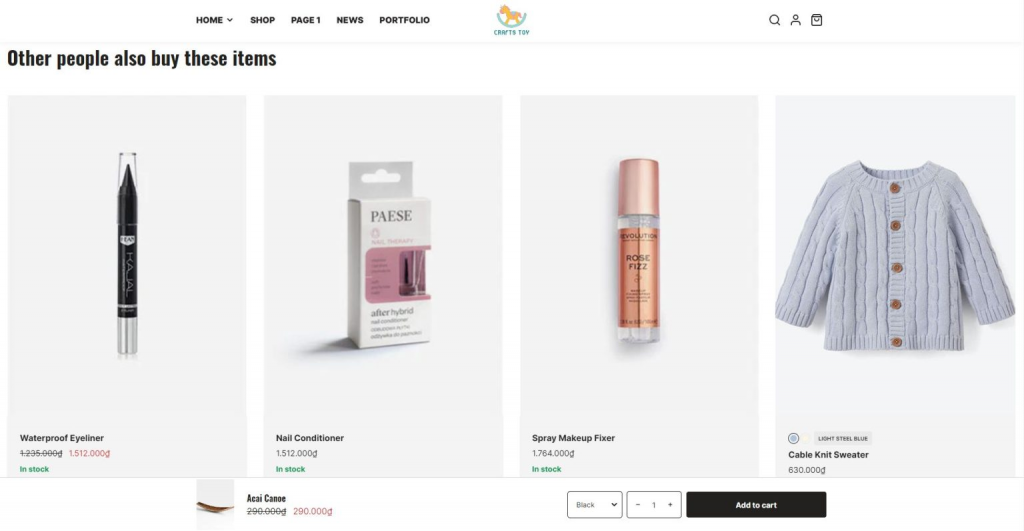
Pop-ups can be annoying. But when done right, they’re actually helpful:
- Catch people before they leave with an exit-intent pop-up showing similar products
- After someone adds to the cart, quickly suggest a matching item
- If someone’s been browsing for a while, slide in some recommendations
The key? Make them easy to close and genuinely relevant.
Sprinkle Recommendations Everywhere (Tastefully)
Don’t limit yourself to product pages. Get creative:
- Writing a blog post about summer fashion? Drop in some product recommendations
- Someone lands on a category page? Show them what’s trending in that category
- Search didn’t return many results? Offer some alternatives
- Even your 404 page can suggest popular products instead of being a dead end
The goal is to make your whole site feel helpful, not annoying. Think of it like a really good salesperson who knows exactly when to step in with a suggestion versus when to let you browse in peace.
Conclusion
Adding “You May Also Like” sections to your Shopify store is one of the best investments you can make in your business. It’s proven to increase sales, help customers discover products they’ll love, and create a better shopping experience overall. Don’t wait to get started. Even a basic Shopify You May Also Like section added today can start boosting your sales immediately. Your customers will appreciate the helpful suggestions, and you’ll appreciate the increased revenue.