
New Feature in Pareto Order Limit: Real-time Inventory Sync
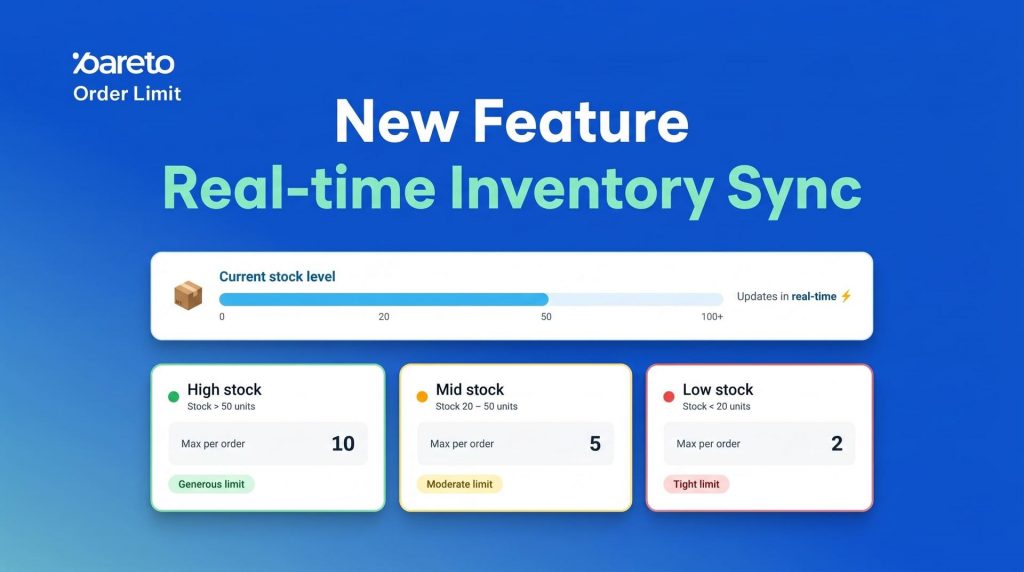
Managing inventory is a balancing act. When stock is high, you want to move products fast. But as items run low, one bulk buyer can wipe out your remaining inventory, leaving other customers frustrated and your stock levels in the red.
Until now, adjusting purchase limits required constant manual monitoring. Today, we’re changing that. We are excited to announce Real-time Inventory Sync – a new automation template for Pareto Order Limit that dynamically adjusts your purchase restrictions based on your actual stock levels.
Automation That Scales With Your Stock
The Real-time Inventory Sync feature ensures that your purchase limits are always in sync with your warehouse. Instead of a “one-size-fits-all” limit, your store can now automatically become more restrictive as items become more scarce.
Why This is a Must-Have for Your Store:
✅ Prevent Overselling: Stop the “out-of-stock” checkout errors by lowering limits before you hit zero.
✅ Protect Popular Items: Ensure your best-sellers are distributed fairly among many customers rather than a few bulk buyers.
✅ Set-and-Forget Efficiency: Eliminate the need for manual edits every time you restock or run a flash sale.
✅ Tiered Logic: Create custom “safety zones” – for example, allow a max of 10 items when stock is high, but automatically drop that limit to 2 when inventory dips below 20.
How It Works: The Tiered Logic
The system operates on a simple but powerful “If/Then” logic. You define a Default Rule for normal operations and then layer on Inventory-based Tiers for specific scenarios.
| Scenario | Stock Level | Limit Rule Applied |
| Normal Operations | No conditions met | Default Rule (e.g., Max 20) |
| Low Stock Warning | Below 50 units | Tier 1 (e.g., Max 5) |
| Scarcity Protection | Below 10 units | Tier 2 (e.g., Max 1) |
Setting Up Your First Sync Rule
You can activate inventory-based limits across your entire store or specific products in just a few steps:
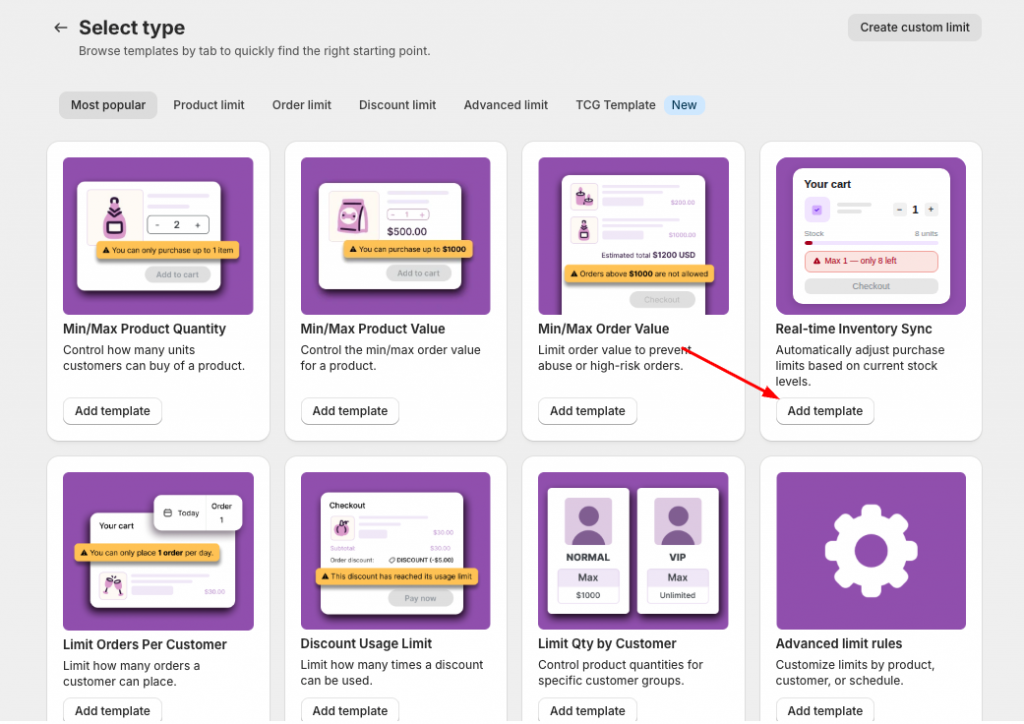
Select the Template: Go to Create Rule and choose the Real-time Inventory Sync template.
Define the Default: Set your standard Min, Max, and Multiples for when inventory is plentiful.
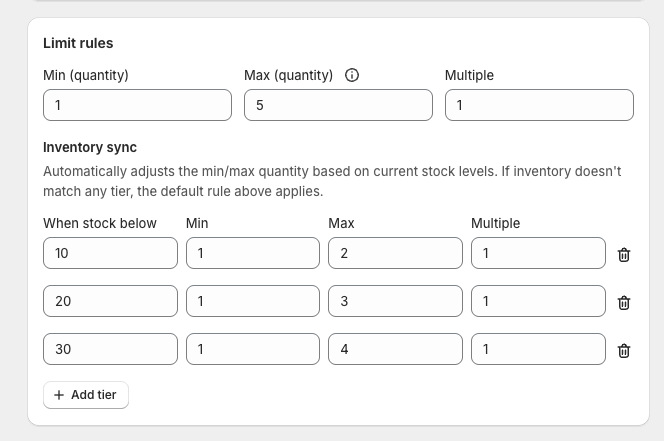
Add Your Tiers: In the Inventory Sync section, add your thresholds. Define exactly what the limit should be when stock falls below a certain number.
Target Your Audience: Choose to apply the rule to all products, specific collections, or even individual variants. You can even restrict these rules to specific Markets or Customer Tags.
Schedule (Optional): Set a start and end time for the rule – perfect for protecting inventory during high-traffic BFCM or seasonal events.
Because Pareto integrates deeply with Shopify Markets, you can tailor these inventory restrictions per country. This allows you to protect stock for your domestic market while maintaining different rules for international regions, all updated in real time.
Ready to stop manual updates and start protecting your margins? Our team is here to help you configure your first tiered rule. Reach out via live chat or reply to this announcement to get started!
👉 Try Real-time Inventory Sync Now
Keep inventory under control, protect your products, and reduce manual work automatically.
Try Pareto on Shopify