
Get Your Holiday Discount Widget Ready for BFCM with Pareto
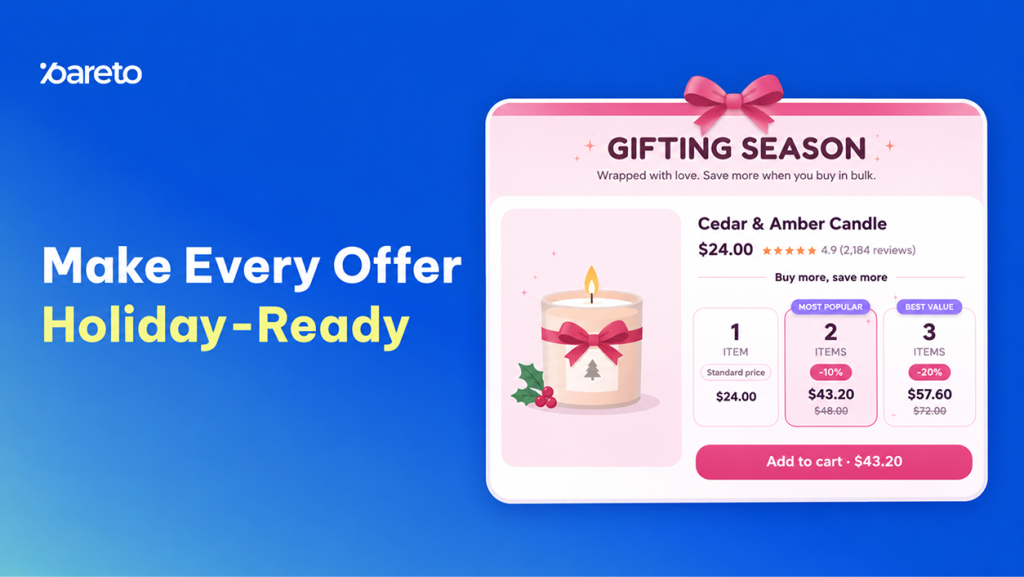
Double 11, Black Friday, Cyber Monday, Christmas, New Year and Lunar New Year all land in the same few months. Your offers are probably planned already. The problem is that your homepage and ads look festive while the discount widget on the product page still looks like a normal weekday.
Pareto now lets you turn your existing offer into a holiday discount widget without rebuilding the campaign. On Shopify, Holiday Accent adds a festive ribbon or Black Friday badge to your widget. On Shopline, you can pick from 12 holiday themes with new layouts, countdown timers, banners and background effects. Your discount rules and settings stay the same.
Holiday Discount Widget Styles Now Live on Shopify and Shopline
The update ships in both Pareto apps, with a different feature set on each platform.
- Shopify – Holiday Accent: Add a Holiday Ribbon or Black Friday Badge on top of your widget, with an optional background color to match your store.
- Shopline – 12 holiday themes: Pick a theme and Pareto fills in the display settings for Quantity Breaks, Bundle and Order Discount campaigns. You can still edit every setting.
- Shopline – new widget layouts: Stacked cards, Coupon and Grid for Quantity Breaks. List, Showcase and Checklist for Bundles. Classic, Compact and Milestones progress bars for Order Discounts.
- Shopline – urgency and effects: Add a countdown timer, a banner title, and Snow, Confetti, Sparkles or Lanterns effects.
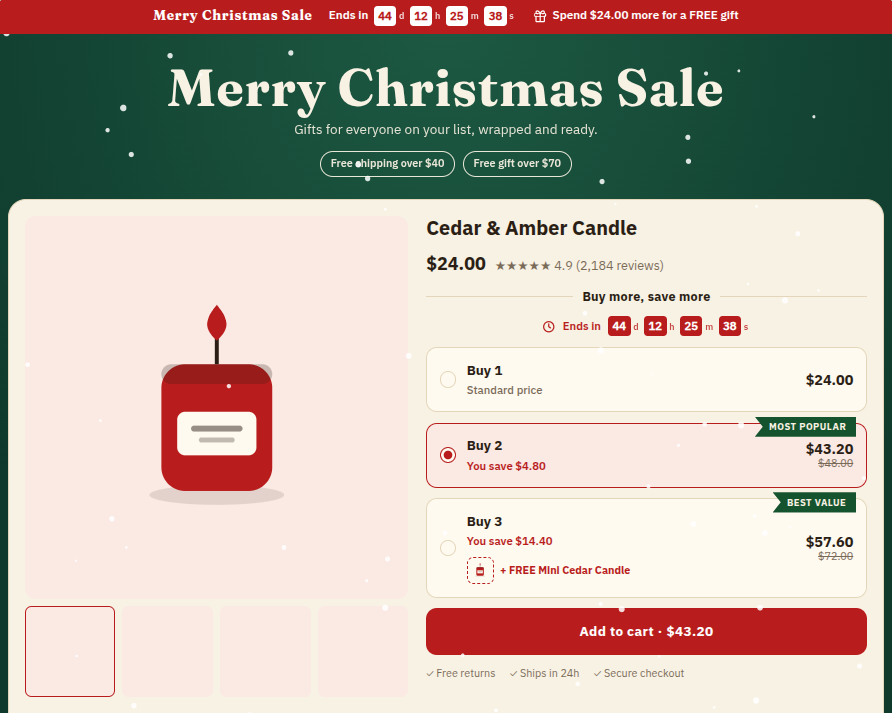
Why a Seasonal Discount Widget Helps Your BFCM Offers Convert
During the holidays, shoppers compare offers fast. Your widget is where the buying decision happens, so it should carry the same holiday message as the rest of your store.
- Consistent campaign look: The offer on the product page matches your Black Friday or Christmas homepage, emails and ads.
- Urgency where it counts: On Shopline, a countdown timer next to your quantity tiers shows shoppers the deal ends soon.
- The deal is easier to spot: A ribbon, badge or banner pulls attention to the tier or bundle you want shoppers to choose.
- No redesign before peak season: You restyle a campaign in minutes instead of building a new widget. When the season ends, you can switch back.
Want to set up the offer itself first? See how Pareto volume discounts work.
Shopify: Add a Holiday Accent to Your Quantity Breaks Widget
Holiday Accent places the badge you choose on top of your discount widget and adjusts the widget’s color palette to match. Choose from two badges:
- Holiday Ribbon: For Christmas, Valentine’s Day or general festive sales.
- Black Friday Badge: For Black Friday and Cyber Monday events.
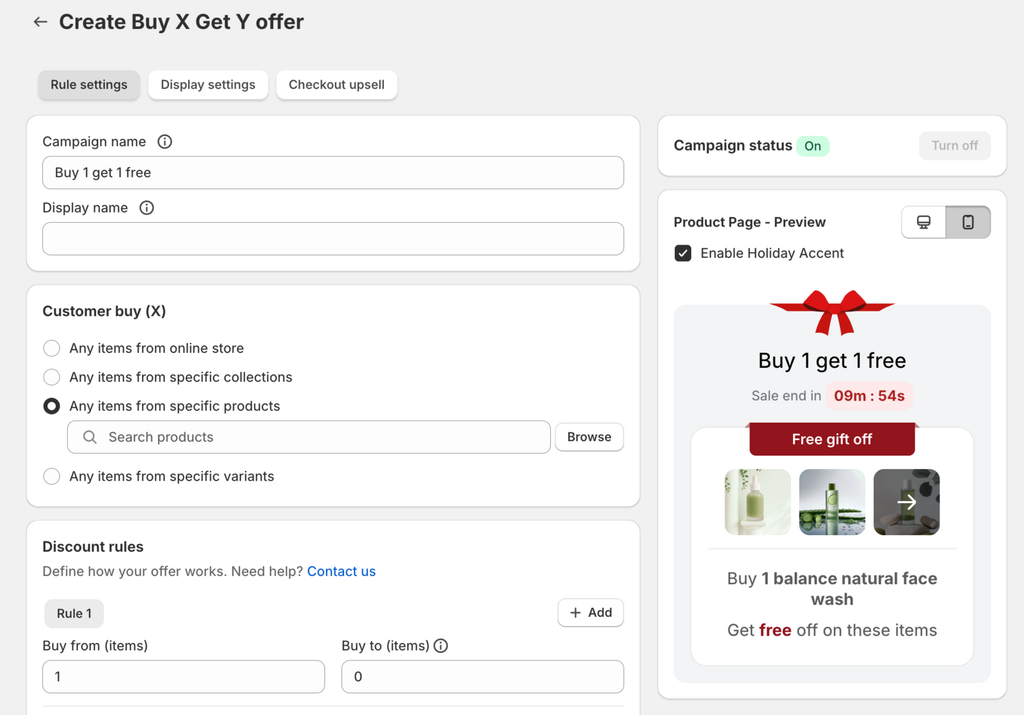
Quick setup (5 steps)
- Open Pareto and go to the Campaigns tab.
- Click the campaign you want to style, then go to the Product Page – Preview section.
- Check Enable Holiday Accent.
- Choose Holiday Ribbon or Black Friday Badge. Optionally, change the Background widget color to fit your store design.
- Click Save.
Holiday Accent works with the Quantity Breaks Dynamic Options layout and with other offer type layouts such as Buy X Get Y and Mix & Match. If your campaign uses another layout, the option does not appear in the editor. Full steps are in the Holiday Accent guide.
Shopline: 12 Holiday Themes for Quantity Breaks, Bundles and Order Discounts
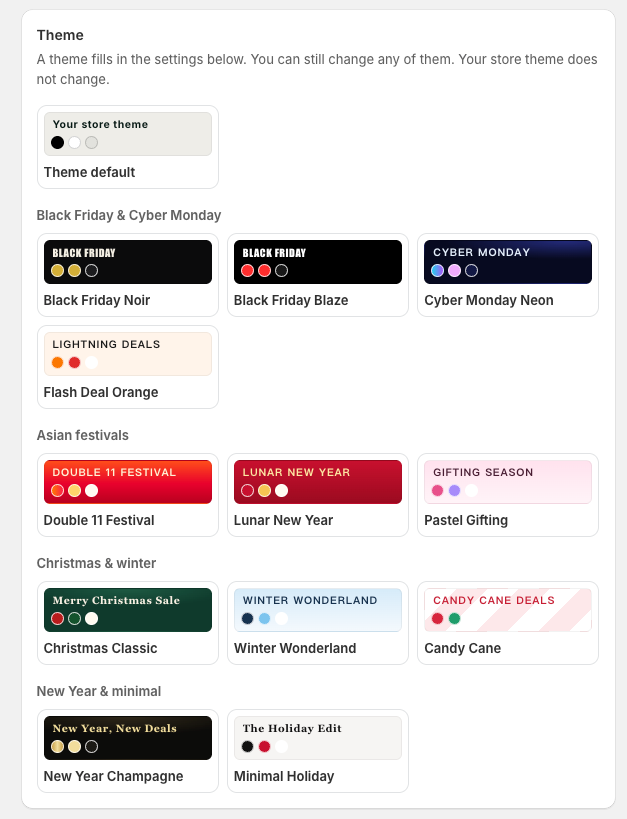
On Shopline, a holiday theme restyles the whole widget in one step. The themes are Black Friday Noir, Black Friday Blaze, Cyber Monday Neon, Flash Deal Orange, Double 11 Festival, Lunar New Year, Pastel Gifting, Christmas Classic, Winter Wonderland, Candy Cane, New Year Champagne and Minimal Holiday. Theme default keeps your store’s Add to cart button colors, font and corner radius.
- Banner title and countdown: Set Title style to Banner with a solid or gradient background, and turn on Show countdown timer with your own Countdown label.
- Background effects: Choose Snow, Confetti, Sparkles or Lanterns, set the Density, and show it on the whole product page or around the widget only.
- Gift popups: Free gift campaigns on Quantity Breaks and Order Discount get a matching popup. With a holiday theme, a badge appears on the gift image.
- Badge styles: Tag, Pill, Ribbon or Stamp badges on tiers and bundles, and a Gift or Tag header icon on Order Discounts.
Quick setup (5 steps)
- Open a Quantity Breaks, Bundle or Order Discount campaign and click the Display settings tab.
- In the Theme card, pick a holiday theme. The settings update right away.
- In the Layout card, choose a layout and a badge or icon style.
- Set the title, countdown, colors and Effect. To restore a color, open the picker and click Use theme default.
- Preview the widget on the Light, Dark and Warm beige sample stores, then click Save.
See every option in the holiday themes guide for Shopline.
Rules and Limitations for Holiday Discount Widget Styles
- Shopify layouts: Holiday Accent appears only for the Quantity Breaks Dynamic Options layout and other offer type layouts such as Buy X Get Y and Mix & Match.
- Shopline plans: The 12 holiday themes require the Basic plan or higher. On the Free plan you can pick and preview a theme, but not save or activate it. Layouts, banners, countdowns, effects and colors are available on every plan.
- Downgrading on Shopline: You can’t switch to the Free plan while a holiday-theme campaign is active. Set those campaigns to Draft first.
- One effect per page: If several campaigns on a page have effects, the newest campaign’s effect shows. Effects don’t block clicks and are skipped for shoppers who have reduced motion turned on.
- Whole-page effects: To show an effect across the whole product page, enable the Pareto app embed first.
- Existing campaigns: On Shopline, campaigns created before the update keep their current look until you pick a theme. Banner titles use the theme’s font.
Make Your Holiday Discount Widget Live Today
Holiday Accent is live in Pareto on Shopify, and holiday themes are live in Pareto on Shopline. Open a campaign, apply the holiday style, and save before your sale starts.
Need help with the setup? Message us through in-app live chat, or WeChat on Shopline, or book a free 1-on-1 call. We’ll walk you through it before your sale goes live.
Give your discount widget a holiday look
Add holiday badges, themes and countdowns to your offers before peak season starts.