
New Shopify Bot Protection Templates for Card Testing and Drops
Some of the hardest store abuse looks like normal traffic. A bot places a string of tiny orders on your cheapest product to find out which stolen cards still work. A reseller clears out a limited drop in minutes, and your real customers see “sold out” before they reach the product page.
Pareto Order Limits now includes two ready-to-use Shopify bot protection templates: Card Testing Protection and Drop Protection. Each one sets up the right checks in a single rule, so you don’t have to build the protection piece by piece.
Shopify Bot Protection Templates Now Live in Pareto Order Limits
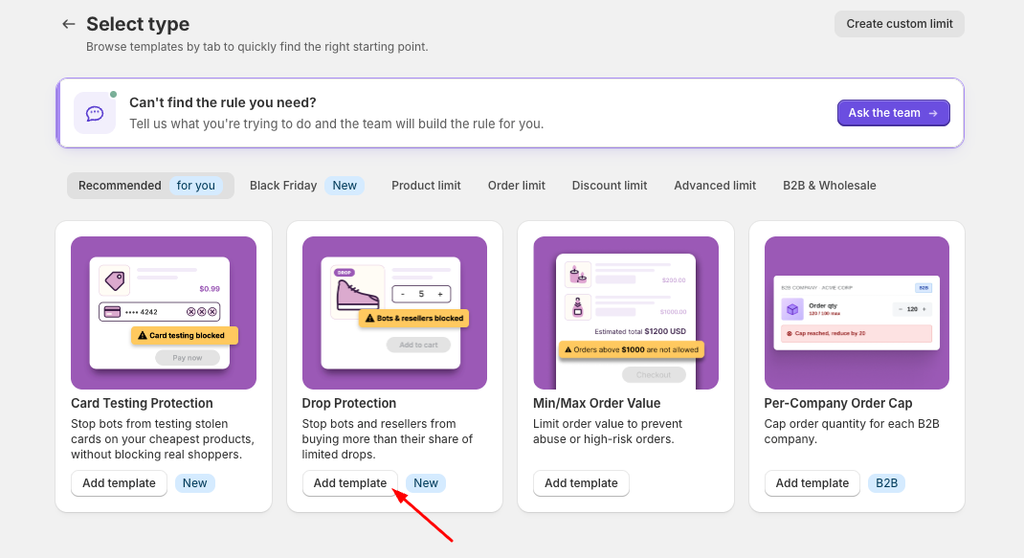
Both templates sit in the Recommended tab when you create a limit. They are available on all plans. Card Testing Protection is included on every plan, Free included.
- Card Testing Protection: brings four checkout checks into one rule to stop bots testing stolen cards on low-priced products.
- Drop Protection: limits how much each logged-in customer can buy and blocks guest purchases on limited editions, launches and high-demand releases.
- Quick setup from the Dashboard: pick Stop bots and card testing in Quick setup and choose a template.
- No Shopify Plus required: checkout blocking works on every Shopify plan.
Why Bot Protection at Checkout Protects Revenue and Inventory
Fewer fraudulent test orders: card testing bots place many small orders, often with one cheap product. Blocking them at checkout keeps those orders out of your store.
Less friction for real buyers: Card Testing Protection checks new customers by default. Logged-in returning customers who have ordered before aren’t checked.
Fairer limited drops: a per-customer limit gives more real shoppers a chance to buy instead of one reseller taking the stock.
Inventory stays under control: Lifetime, daily, monthly or yearly limits keep a drop from being bought out in a few large orders.
Stop Card Testing on Shopify With 4 Checks in One Rule
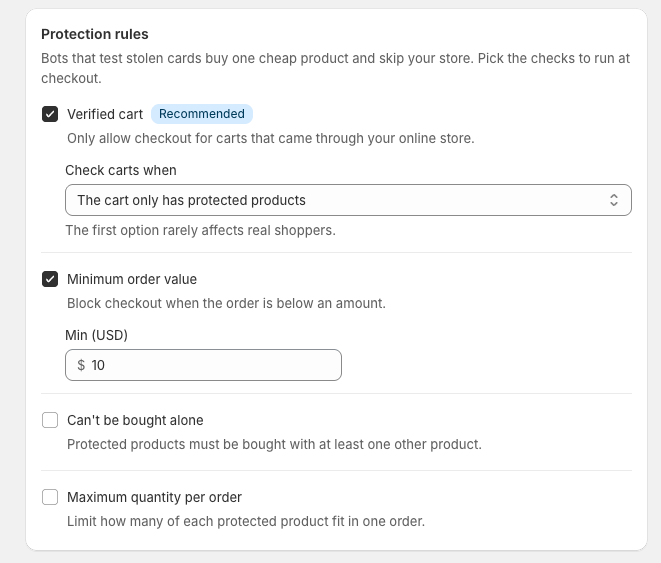
Card testing bots usually skip your online store and go straight to checkout. Card Testing Protection lets you turn on any of these checks (select at least one):
- Verified cart (Recommended): only allows checkout for carts that came through your online store, which stops bots that skip your storefront or cart page.
- Minimum order value: blocks checkout when the subtotal (after discounts, before shipping and taxes) is below the amount you set.
- Can’t be bought alone: protected products must be bought with at least one other product. Different variants of the same product count as one product.
- Maximum quantity per order: limits how many of each protected product fit in one order.
Shoppers who break a check see one neutral message. The default is “We couldn’t complete this order. Please return to your cart and try again.” Keep it neutral on purpose: a message that explains the rule tells fraudsters what to change.
Limit Purchases per Customer During Limited Drops
Drop Protection creates two rules, because guests have no customer account and the app can’t count what they bought before:
- Rule 1, logged-in customers: sets a minimum and maximum quantity each customer can buy, with a limit scope of Lifetime, Per day, Per month or Per year.
- Rule 2, guest shoppers: blocks guests from buying the drop products. Guests see “Log in to buy this item.” on the product page, cart and checkout.
Logged-in customers see “Limit %max per customer.” by default, where %max shows your per-customer limit. You can also add the optional Verified cart check to stop bots that skip your store.
Step-by-Step: Set Up Shopify Bot Protection
Quick setup for Card Testing Protection (6 steps)
- Go to Dashboard -> Quick setup -> Stop bots and card testing, or go to Limit purchase -> Create limit. In the Recommended tab, select Card Testing Protection.
- Name your rule. In Apply limit to, choose the products to protect and click Browse. Start with your cheapest products, since bots target those first.
- In Protection rules, check the protections you want. For Verified cart, choose a Check carts when option. The cart only has protected products is the default and rarely affects real shoppers.
- Review the Store Check card. If the app embed is off, click Turn on app embed, then Check again.
- Adjust Countries/regions and the customer group if needed. New customers is the default.
- Check the schedule and click Save. Set schedule and Set end date are on by default, so the rule runs for 3 days and then turns off. Uncheck Set end date to keep it running.
Tip: during the first 3 days, review your orders and abandoned checkouts to see what the rule is catching before you make it permanent.
Quick setup for Drop Protection (6 steps)
- Open the template the same way and select Drop Protection in the Recommended tab.
- Name your rule. In Apply limit to, choose the products in your drop and click Browse.
- Under Limit per customer (always on), enter Min (quantity) and Max (quantity), then pick a Limit scope. With Lifetime, the app counts every order the customer has placed for each protected product.
- Optionally check Verified cart. Then confirm in Store check that the app embed is on, customer accounts are on and cart notes are allowed.
- Set Countries/regions if the drop is only for some markets, and check Set schedule to run the rule only during the drop.
- Edit messages in the Message settings tab, then click Save. The app creates both rules. Use Go to rule 1: Logged-in customers or Go to rule 2: Block guests in the banner to switch between them.
The Limit preview panel on the right shows what shoppers will see. For translated messages, follow the notification translation guide.
Rules, Eligibility and Limitations of the Bot Protection Templates
- App embed: Verified cart needs the app embed. If it’s off, Verified cart is locked with a Needs app embed badge, and the other 3 card testing checks still work. See how to enable the app.
- Headless stores: headless stores don’t use the app embed, so Verified cart isn’t checked there. The other protections still run.
- Cart notes: the app adds a hidden note to carts from your store, so cart notes must be allowed.
- Customer accounts: Drop Protection needs customer accounts turned on so the app can count what each customer buys.
- Where shoppers see messages: real shoppers who break Minimum order value, Can’t be bought alone or Maximum quantity see your message on the cart page. Any checkout that breaks a protection is blocked with that message.
Start Using Shopify Bot Protection Today
Card Testing Protection and Drop Protection are live now in Pareto Order Limits on all plans. Open Dashboard -> Quick setup -> Stop bots and card testing to pick a template.
Not sure which protection fits your store first? Message us through live chat and we’ll help you set it up.
👉 Stop Card Testing and Drop Bots at Checkout
Set up Card Testing Protection or Drop Protection in a few minutes with ready-made templates.
Install Pareto Order Limits