
How To Do Shopify Discount Combinations Without Hurting Your Margins
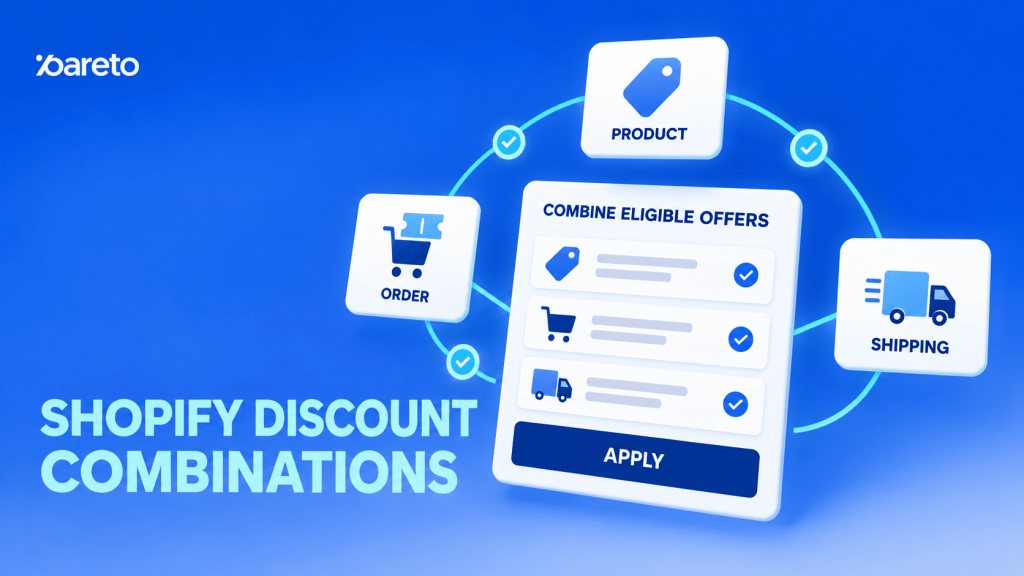
Running one discount is easy. Running several at the same time is where things get more complicated. A store may already offer free shipping, a welcome code, a product sale, and a cart discount. When a customer qualifies for more than one offer, what happens? Do they get all of them? Does Shopify pick one? Can two codes work together? That is what Shopify discount combinations are designed to manage.
Shopify lets merchants control which discounts can work together in the same order. This gives stores more flexibility, but it also creates more room for mistakes. A combination that looks attractive on a campaign banner can become far more expensive once every discount reaches the cart. This guide explains how discount combinations work, how to combine discounts on Shopify, when stacking can help sales, and when keeping an offer simple is the better choice.
What Does Combining Discounts on Shopify Mean?
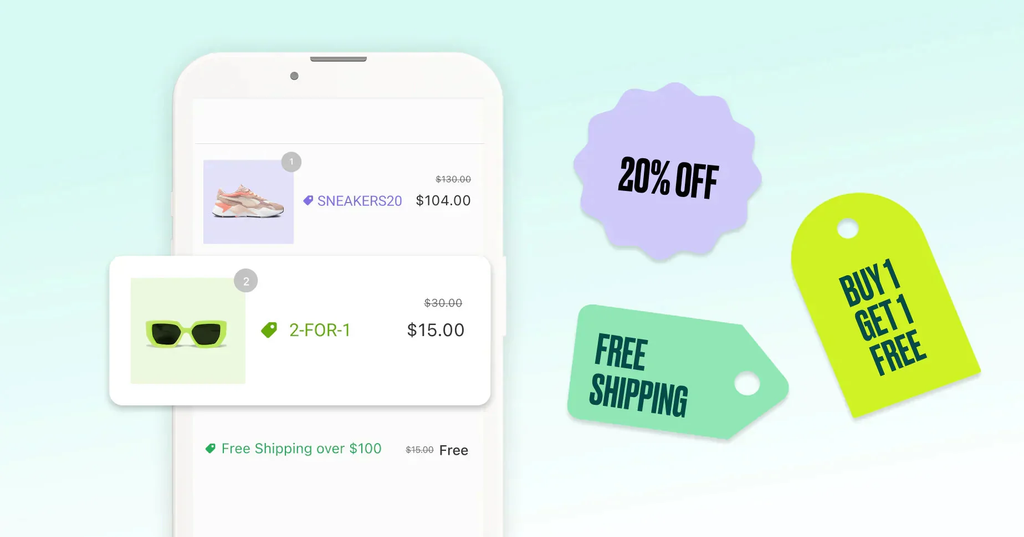
Combining discounts means allowing a customer to receive more than one eligible discount in the same order.
Shopify mainly groups discounts into three classes:
- Product discounts reduce the price of specific products or collections.
- Order discounts reduce the value of the overall order.
- Shipping discounts reduce shipping costs or make shipping free.
A store might run 15% off a skincare collection and free shipping on orders over $80. If both offers are allowed to combine, a shopper who meets both conditions can receive both benefits.
Another store could offer 20% off selected products and another 10% off orders above $150.
These offers may also work together, depending on how the merchant sets up the combination rules.
The important point is that Shopify does not simply treat every active promotion as one big pool of discounts. Each discount has its own conditions and combination settings.
So, having several active offers does not automatically mean customers can stack all of them.
A combined discount can look similar to a larger promotion, but the logic behind it is different.
For example:
- 20% off selected jackets
- 10% off orders over $200
- Free shipping over $100
Each offer solves a different problem.
The product discount makes the jackets more attractive. The order discount gives customers a reason to build a larger cart. Free shipping removes another cost at checkout.
This is why discount combinations can be useful. Instead of giving one large discount to everyone, merchants can use several smaller incentives to guide different actions.
The problem starts when those offers overlap without a clear reason.
Which Shopify Discounts Can Be Combined?
Shopify lets merchants combine several types of discounts in the same order, but not every discount can stack with every other one. What works depends on the discount type, its combination settings, and, in some cases, the Shopify plan.
The most common combinations include:
- Product discount + shipping discount: For example, 20% off selected products together with free shipping.
- Order discount + shipping discount: A customer can receive a discount on the whole order and still qualify for free shipping.
- Product discount + product discount: Two product discounts can work together when they apply to different eligible items.
Some stores can also combine product discounts with order discounts, or apply more than one eligible order discount to the same purchase.
Applying multiple product discounts to the same item is more restricted. Shopify Plus gives merchants more flexibility here, while stores on other plans generally cannot keep stacking several product discounts on the same product.
Shipping discounts have a clearer rule: only one shipping discount can apply to an order. A shipping discount can still combine with eligible product or order discounts, but two separate shipping offers cannot stack together.
For Shopify Plus stores that need more control, this can go one step further. Pareto Quantity Breaks supports stacking discounts per cart line item, so multiple eligible offers can apply to the same product or variant when they share the same stack tag. This is useful when a merchant wants to combine offers such as quantity breaks, one-time discounts, or bundle-related promotions on the same line item instead of letting only the highest discount win.
Automatic discounts and discount codes
Discount combinations are not limited to customers entering several codes at checkout. An automatic discount can also work alongside a discount code.
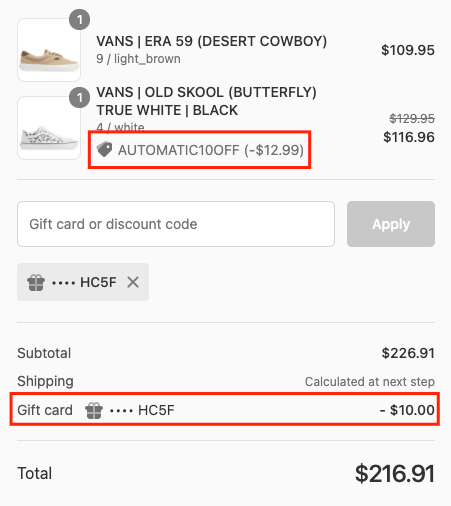
For example, a store might automatically offer: Buy three products and get 15% off.
The customer may also have a free shipping code.
If both promotions are eligible and their combination settings allow them to work together, the customer can receive both benefits in the same order.
This is useful when one offer should apply automatically while another is tied to a campaign, customer group, or discount code.
However, simply having both discounts active does not mean they will stack. Their combination settings still need to be compatible. If the available discounts cannot be used together, Shopify applies the best eligible discount or combination for the order.
Shopify discount combination limits
Shopify also sets limits on how many discounts can be active or applied.
A store can have up to 25 active automatic discounts, including eligible app-based automatic discounts. Customers can also use multiple eligible product or order discount codes in one order, together with one eligible shipping discount.
These limits show what Shopify technically allows, but they should not be treated as a target.
Giving customers too many overlapping offers can make the promotion harder to understand and make it more difficult for merchants to predict the final discount.
A better approach is to give each discount a clear role. One might encourage customers to buy a specific product, another might increase order value, while free shipping removes an extra cost at checkout.
Once you know which discounts can work together, the next step is deciding how to set those combinations up in Shopify.
How to Combine Discounts on Shopify
For native Shopify discounts, combination settings are managed in Shopify Admin > Discounts.
Step 1: Create or open a discount
Create a new discount or open an existing one, then set the usual conditions such as the discount value, eligible products, minimum purchase amount, customer eligibility, usage limits, and campaign dates.
Step 2: Set the combination rules
Before choosing the combination settings, it helps to understand what Shopify means by combining discounts. Two discounts being allowed to combine does not always mean their savings will stack on the same product.
For example, suppose you have:
- SUMMER20: 20% off Product A
- VIP10: 10% off Product B
These two product discounts can apply in the same order because they affect different items.
But if SUMMER20 and VIP10 both apply to Product A, Shopify normally does not stack both product discounts on that same item. Instead, Shopify applies the better eligible discount. Applying multiple product discounts to the same line item is available only on Shopify Plus and requires merchants to configure those discounts specifically for same-item combinations.
This distinction is important when setting your combination rules:
| Combination | How it works |
|---|---|
| Product + Product | Can apply in the same order when they discount different items. Stacking multiple product discounts on the same item requires Shopify Plus. |
| Product + Order | Both can affect the same purchase on eligible stores. The product discount applies first, then the order discount is calculated from the revised subtotal. |
| Product + Shipping | Both can apply to the same order. |
| Order + Order | Multiple order discounts can combine on eligible stores. |
| Order + Shipping | Both can apply to the same order. |
| Shipping + Shipping | Cannot be combined. Only one shipping discount can apply per order. |
So, when Shopify asks which discount classes a promotion can combine with, think about which discounts can run in the same order, not simply whether two percentages can be added together on one product.
If you are on Shopify Plus and specifically want two product discounts to stack on the same product, use Shopify’s Configure product discounts on the same line item settings. You can define which product discounts are allowed to work together using discount tags.
One more distinction: bundle pricing is not automatically the same thing as discount stacking. If you create a fixed bundle made up of specific products and shoppers receive the bundle offer after meeting its product requirements, that bundle logic should be considered separately from Shopify’s discount combination settings. Whether another discount can apply on top depends on how the bundle and its discount are implemented.
The safest approach is to map each promotion by discount class + target + combination rule before launch, then test the final cart at checkout. This prevents a common mistake: marking two product discounts as combinable and expecting both to reduce the same item.
Step 3: Save and test the offer
Once the rules are set, save the discounts and test them with a real cart. Check that the correct products are discounted, spending thresholds work as expected, and the final order value matches the promotion you planned.
For example, a store could offer 15% off summer dresses plus free shipping on orders over $75. If both discounts are set to combine and the customer meets the conditions, both benefits can apply in the same order.
This type of setup is easy to understand because each discount has a different role: the product discount makes the items more attractive, while free shipping gives the customer another reason to complete the purchase.
How Shopify applies combined discounts
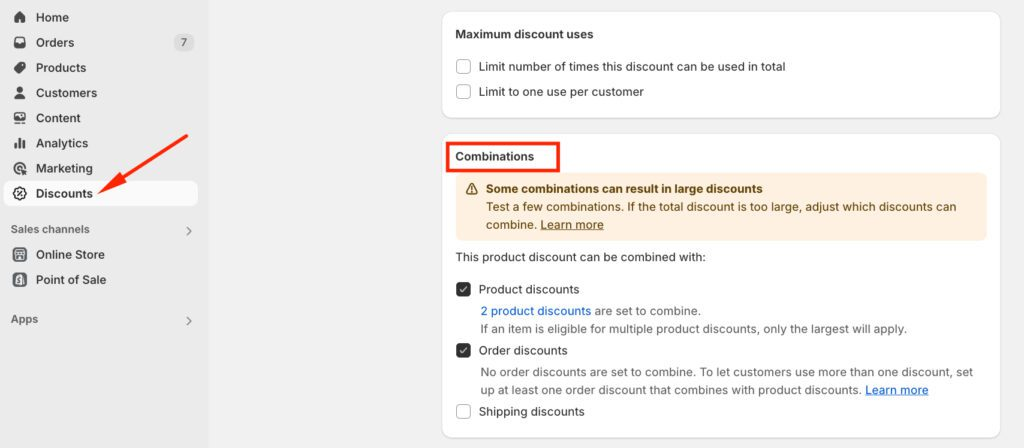
Product discounts reduce eligible item prices first. Order discounts are then calculated on the eligible order value, and shipping discounts apply to the shipping charge.
For example, if a $100 eligible order has two combinable order discounts of 10% and 20%, the customer can receive $10 from the first discount and $20 from the second, for a total of $30 off.
This is why the final checkout value matters more than looking at each discount separately. Before launching a campaign, test the exact combination customers will use to make sure the savings and remaining margin are both what you expect.
When Should You Use Shopify Discount Combinations?
Shopify discount combinations work best when each offer has a clear purpose. One discount might encourage customers to buy more products, while another helps increase order value or removes shipping costs.
Increase average order value
A common approach is to combine a product discount with a spending threshold.
For example, a store could offer 15% off selected shirts and $20 off orders over $150. The first offer makes the products more attractive, while the second encourages customers to add more items to their cart.
The threshold should be high enough to increase spending, but still realistic for customers to reach.
Combine product discounts with free shipping
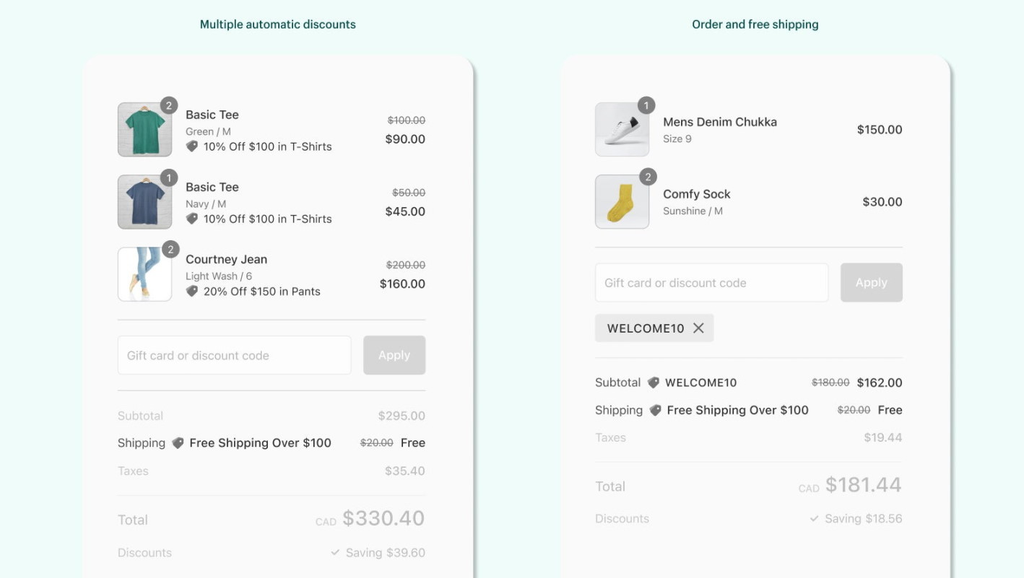
Product discounts and free shipping often work well together.
For example, a store could offer 20% off selected products plus free shipping on orders over $100. Customers get an immediate saving on the products, while the shipping threshold gives them another reason to increase their order value.
This is also easy to understand, which makes the promotion less confusing at checkout.
Run seasonal promotions with existing offers
Discount combinations can help merchants run seasonal campaigns without turning off every existing promotion.

For example, a Black Friday product discount could still work with free shipping, while a larger sitewide discount might be kept separate from a welcome code.
This gives merchants more control over how much customers can save during busy sales periods.
Move selected inventory
Instead of discounting the whole store, merchants can use product discounts on items they want to move and combine them with an order-level offer.
For example, a store could offer 25% off older T-shirts and $15 off orders over $120. The product discount helps clear older stock, while the order discount encourages customers to add other items to the cart.
Support BOGO and gift promotions
Buy X Get Y offers can encourage customers to add more products.
For example:
- Buy two lip products and get the third free.
- Buy two T-shirts and get an accessory at 50% off.
These offers can sometimes work with other discounts, but merchants should be careful when several product discounts target the same items. In many cases, it is simpler to let the BOGO offer apply to one product group and combine it with an order or shipping discount.
Target different customer groups
Different customers may respond to different offers.
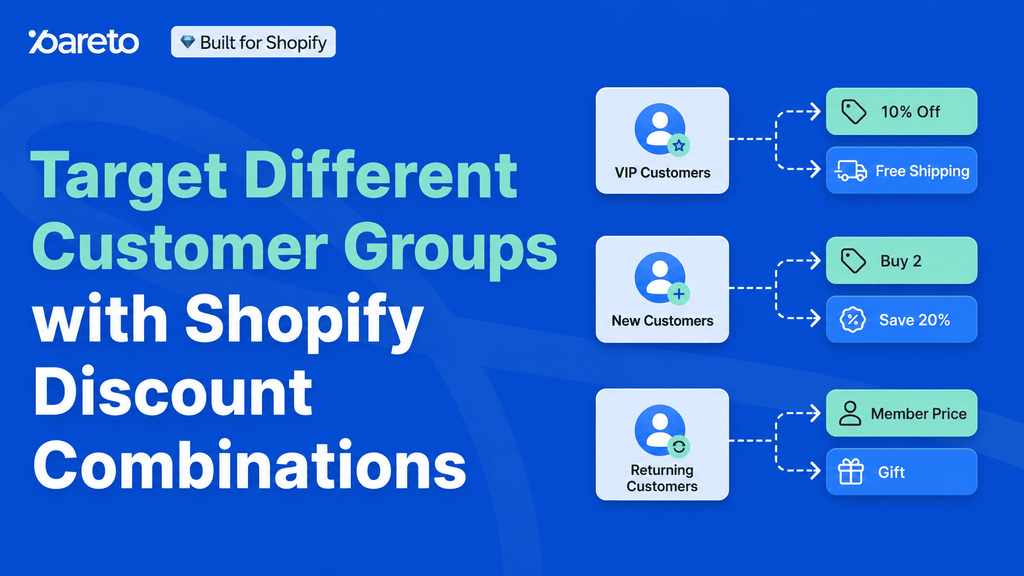
New customers might receive 10% off their first order, returning customers could get free shipping, while wholesale buyers may receive volume discounts.
The goal is not to give everyone more discounts, but to use the right offer for the right customer.
Discount Combinations vs. Bundles: What’s the Difference?
Discount combinations and discount bundles can both increase order value, but they work differently.
A discount combination applies several eligible discount rules to the same order. For example, a customer might get 10% off selected products and free shipping at the same time.
A bundle groups products together under one offer. For example, “Choose any three candles for $30” is a bundle rather than a discount combination.
Fixed bundles and mix-and-match bundles
A fixed bundle contains products selected by the merchant, such as a cleanser, serum, and moisturizer sold as one set.
A mix-and-match bundle creates a separate bundle product made up of selected child products. Shoppers choose from the options available inside that bundle rather than simply mixing any eligible items in the store to reach a quantity discount.
For more flexible offers such as “Pick any 6 packs and get 15% off” or “Choose one product from each category to build your set,” use Pareto’s Build Your Own Bundle setup instead. It is designed to let shoppers build a bundle from the product choices you define.
If the goal is simply to reward shoppers for buying a certain total quantity across selected items, you may not need a bundle at all. Pareto Quantity Breaks can apply the discount across targeted products, variants, collections, or groups. Depending on the campaign setup, the qualifying quantity can be counted across all targeted items or separately by product, variant, or collection.
For example, a merchant could target a snack collection and offer 15% off when shoppers buy six eligible items in total, even if those six units are a mix of different products or variants. This is a quantity-break rule rather than a mix-and-match bundle.
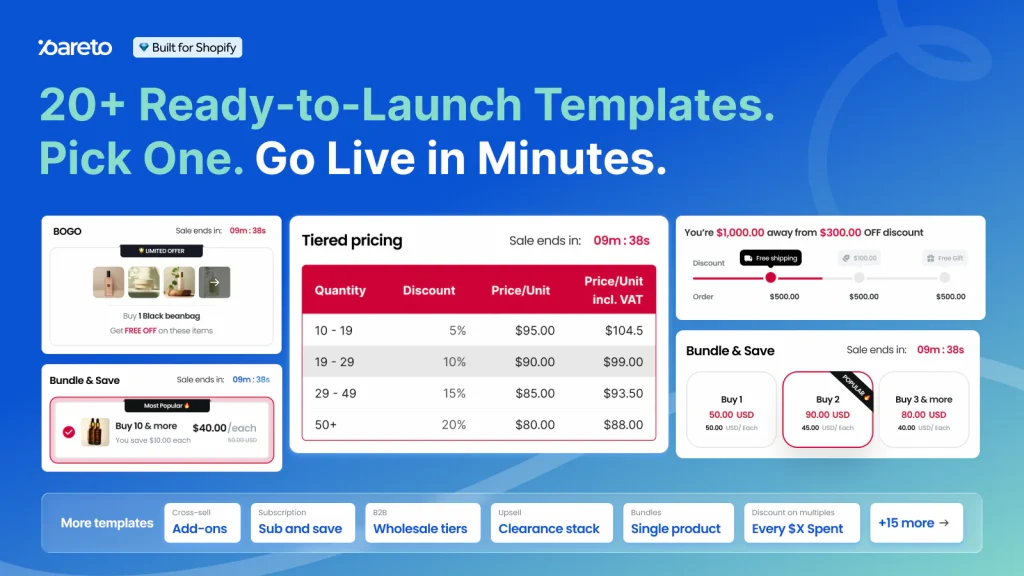
In case you need, Pareto Quantity Breaks supports fixed and mix-and-match bundles, Build Your Own Bundle, quantity discounts, BOGO, free gifts, upsells, and cross-sells.
Pareto Case Study: Managing discount conflicts across Meta and Klaviyo
A merchant using Pareto ran into a discount conflict while also sending campaign codes through Meta and Klaviyo.
The Pareto team first checked where each code came from instead of changing the bundle or discount setup immediately. The merchant’s Meta-generated codes, such as IG-EMAIL-XXXXXX, were created without combination support, so they could not combine with product, order, or shipping discounts already in the cart. This restriction came from the campaign code itself, not the Pareto offer.
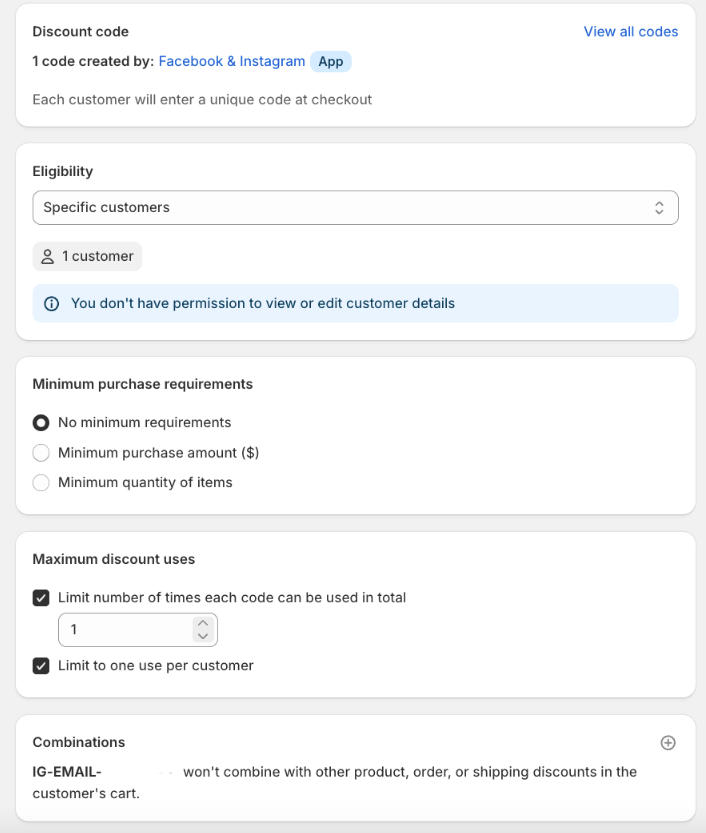
The merchant’s Klaviyo codes were different. These discounts could be found by their naming pattern in Shopify Admin > Discounts, where the merchant could review and adjust their combination settings to work with Pareto offers.
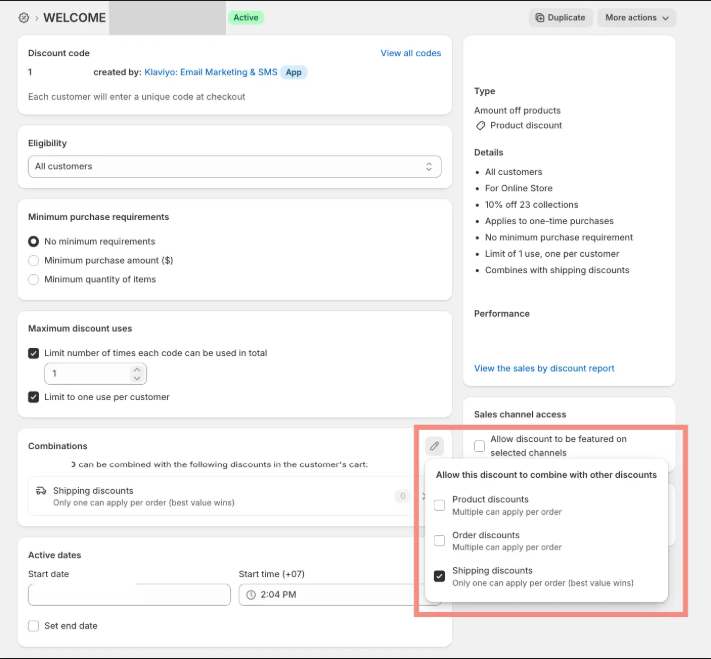
This is also where Pareto’s customization support becomes useful. When a promotion does not behave as expected, the team can help merchants trace which discount is causing the conflict, check its combination rules, and adjust the promotion setup instead of simply disabling other offers.
For stores running several campaigns at once, this makes it easier to keep Pareto offers working alongside eligible email, paid social, product, order, and shipping promotions without creating unexpected discount conflicts at checkout.
Can bundles combine with other discounts?
Yes, but it depends on how the bundle discount is created.
If the bundle is created as a separate bundle product with its own bundle price, rather than through a Shopify automatic discount, shoppers can still use eligible Shopify discount codes on the order. In this case, the bundle price is already built into the product, so it does not compete with another automatic discount in the same way.
If the bundle uses an automatic discount, Shopify’s discount combination rules matter. Product, order, and shipping discounts can coexist in the same order when their combination settings allow it. However, combination does not necessarily mean stacking discounts on the same item.
Pareto offers are set to combine with other eligible discounts by default. For example, a Pareto product discount and a shipping discount can both apply to the same order. But if two product discounts target the same product, Shopify normally applies the one that gives the shopper the better value rather than applying both to that line item.
For Shopify Plus stores, Pareto also supports multiple product discounts on the same line item, allowing eligible product discounts to stack on the same product when this behavior is configured.
Pareto does not assign priority to one discount over another. If merchants do not want a Pareto offer to combine with another promotion, they should make the other discount non-combinable or contact the Pareto team for help configuring the intended behavior.
Always test the full cart before launch to make sure the final discount still matches your plan.
How to prevent discount conflicts in Shopify
Discount conflicts usually happen when several promotions target the same cart, product, or variant but were created without a clear relationship between them. This becomes more noticeable when a store runs sitewide promotions, product offers, automatic discounts, and campaign codes at the same time.
Before launching a promotion, map out which discounts can appear together and what should happen when they overlap. The following practices can make that setup much more predictable.
1. Build a discount hierarchy from broad to specific
Start by deciding which offers should be more valuable when multiple discounts target the same purchase.
A practical hierarchy is:
Sitewide < Collection < Product group < Product < Variant
The narrower the offer, the stronger the discount can be.
For example:
- Sitewide: 5% off
- Summer Collection: 10% off
- Selected T-shirts: 15% off
- Limited-edition T-shirt: 20% off
This structure gives each promotion a clear purpose. A broad offer provides a baseline incentive, while a more targeted campaign gives shoppers a better reason to buy a specific product.
It also reduces situations where two overlapping discounts offer exactly the same saving and compete for the same item.
2. Avoid equal-value discounts with overlapping targets
Be especially careful when two product discounts target the same item at the same value.
For example, suppose Product A qualifies for:
Automatic discount: 10% off Product A
Discount code: 10% off Product A
If these discounts cannot both apply to the same line item, there is no additional saving from applying the second 10% discount. The shopper might therefore expect their code to provide an extra benefit when it actually does not.
The safer approach is to avoid creating identical discounts for overlapping audiences and products.
Instead, give each promotion a clear value difference:
Automatic offer: 10% off Product A
Email code: 15% off Product A
Now the campaign code provides a meaningful benefit rather than competing with an identical automatic offer.
3. Make targeted codes stronger than automatic offers
This is particularly important when an automatic promotion is always running in the background.
Imagine a product normally receives an automatic 10% discount. The merchant then sends a special Product A code through an email campaign.
If that code also gives 10% off, customers may see little or no additional benefit from using it. A stronger code, such as 15%, makes the campaign offer clearly more valuable.
A useful rule is:
When an automatic discount and a discount code target the same product at the same level, make the intentional campaign code more valuable.
This is especially useful for codes created for specific audiences, such as subscribers, affiliates, influencers, or paid acquisition campaigns.
4. Remember that combination is not always stacking
Shopify’s discount combination settings determine whether eligible discounts can exist in the same order. That does not automatically mean two product discounts are added together on the same item.
For example, a product discount and a shipping discount can both contribute to the same purchase when their combination settings allow it.
Two product discounts are different. They might both be eligible within the same order but target different products. If they both target the same product, merchants should not assume the shopper will receive both savings on that line item.
For Shopify Plus stores, multiple product discounts can be configured to apply to the same line item. This is the scenario where true same-item discount stacking becomes relevant.
The distinction matters when planning promotions:
Combination = discounts can work within the same order.
Same-line-item stacking = multiple product discounts actually apply to the same item.
5. Use separate bundle products when the bundle price should not compete as an automatic discount
Not every bundle needs to be implemented as an automatic product discount.
If the merchant creates a separate bundle product with its own bundle price, the saving is already reflected in that product’s pricing rather than competing as another automatic product discount.
For example, instead of adding an automatic “Buy these three products and save 15%” discount, the merchant could sell a three-item skincare set as its own bundle product for $60.
The shopper can then purchase that bundle and still use other eligible Shopify discounts according to their normal combination rules.
This can make promotion management simpler when the bundle should behave like a product offer rather than another discount competing for the same line items.
6. Add minimum purchase requirements to broad promotions
Sitewide promotions have the widest reach, so they are also more likely to overlap with targeted offers.
Instead of running an unrestricted automatic 10% sitewide discount, consider adding a minimum purchase requirement:
10% off orders over $50
This gives the broad promotion a specific job: increasing order value.
A product-level code can then serve a different goal, such as encouraging the purchase of a particular item.
Separating promotions by both target and purchase condition makes the overall discount structure easier to control and can also help protect margin.
7. Map discount rules to the campaign source
Two codes with similar values can still serve very different purposes.
For example, a merchant might use:
Meta campaign → NEW15 → customer acquisition
Klaviyo campaign → VIP20 → retention or repeat purchase
Before deciding whether these discounts should combine with other promotions, look at where each code comes from and what it is supposed to achieve.
For every major campaign, document at least:
Source → Audience → Discount type → Target → Value → Minimum requirement → Combination settings
For example:
Klaviyo → Existing customers → Product code → Product A → 20% → None → Product + shipping allowed
This makes overlapping campaigns easier to spot before they go live. It also prevents a broad automatic promotion from accidentally reducing the perceived value of a code that was created for a specific acquisition or retention campaign.
8. Test overlapping discounts before launch
Finally, do not test each discount only on its own.
Build several carts that reflect situations customers are likely to create:
- Only the automatic offer qualifies
- Only the discount code qualifies
- Automatic discount and code target different products
- Automatic discount and code target the same product
- Two product discounts have the same value
- A product discount appears with an order discount
- A product discount appears with free shipping
- The cart meets or misses a minimum purchase requirement
Check the final cart and checkout totals rather than assuming the combination settings will produce the intended result.
A discount strategy is much easier to manage when every promotion has a clear scope, value, purpose, and relationship with other active offers. The goal is not to make every discount combine with everything else, but to make the outcome predictable when promotions overlap.
Shopify Discount Combinations FAQs
Can I stack two product discounts on the same item?
On most Shopify plans, no. Product discounts can be used together when they apply to different items, but they won’t stack on the same product. If two non-combinable discounts target the same item, Shopify applies whichever gives the customer the bigger saving.
There is one exception: Shopify Plus merchants can configure multiple product discounts to apply to the same line item.
In what order does Shopify apply combined discounts?
Shopify applies discounts in this order:
- Product discounts reduce the prices of eligible items.
- Order discounts apply to the updated subtotal.
- Shipping discounts apply last.
For example, if a product discount reduces a $100 cart to $80, a 10% order discount is calculated from the new $80 subtotal – not the original $100.
What happens if a customer enters a discount code that can’t be combined?
If a discount code can’t combine with discounts already in the cart, Shopify shows: “Discount couldn’t be used with your existing discounts.”
Shopify generally applies the eligible discount or combination that gives the customer the best saving. However, conflicts can happen when an automatic product discount and a discount code target the same product, especially when they offer the same value. Depending on which discount is applied first, one can prevent the other from being used.
For example, if Product A already has an automatic 10% discount and the customer enters another 10% code for Product A, the code may not replace the existing offer as expected.
This is why merchants should avoid overlapping discounts with the same value and plan a clear discount hierarchy. We cover practical ways to do this in How to prevent discount conflicts in Shopify below.
Final Thoughts
Shopify discount combinations give merchants more ways to create flexible promotions, but more discounts do not always mean better results. The best combinations give each offer a clear role, such as increasing order value, promoting selected products, or reducing shipping friction. Whether using Shopify’s native tools or a promotion app, always test the final cart to make sure the offer is clear for customers and still protects your margins.