
New in Pareto Order Limit: Auto-Adjust Quantity
Checkout blocks are conversion killers. We’ve all been there: a customer wants to buy, but a strict limit rule stops them in their tracks, leaving them staring at an error message instead of a “Thank You” page.
At Pareto Order Limit, we believe your limit rules should protect your inventory without punishing your customers. That’s why we’re excited to introduce a smarter way to handle order restrictions: Auto-Adjust Quantity.
Introducing: Auto-adjust Quantity
Previously, if a cart didn’t meet your specific limit requirements, the app would trigger a warning and disable the checkout button. While effective for enforcement, it added friction to the buying journey.
With the new Auto-adjust quantity feature, Pareto now takes a proactive approach. Instead of a hard “Stop,” the app automatically adjusts the item quantity to the nearest valid limit.
Why This is a Game-Changer for Your Store:
- Recover “Lost” Sales: By removing the requirement for customers to manually fix their cart, you significantly reduce abandonment at the most critical stage.
- Friction-Free Checkout: The customer experience remains fluid. If they try to buy 11 when your limit is 10, we simply adjust it to 10 and let them keep moving.
- Prevent Inventory Hoarding: Maintain strict control over your stock levels without making the process feel restrictive or “buggy” to the end-user.
How to Enable Auto-Adjust
Ready to smoothen your checkout flow? You can activate this feature in seconds:
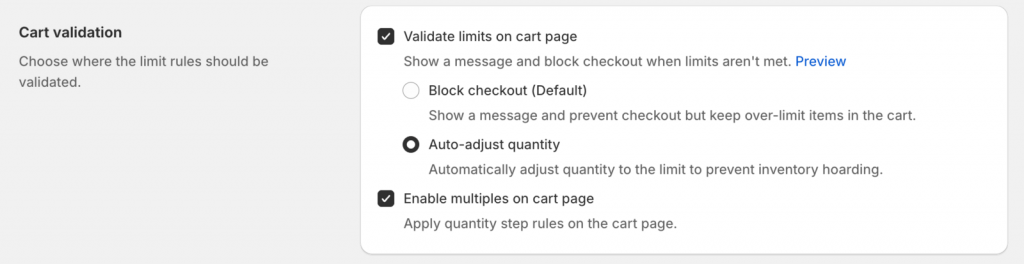
- Navigate: Open the Pareto app and head to App Settings.
- Cart Validation: Find the Cart Validation section.
- Toggle: Select the “Auto-adjust quantity” option (this will replace the default “Block checkout” behavior).
- Save: Hit save, and your store is now optimized for smoother conversions!
A Complete Validation Suite
Auto-adjust works best when paired with our other powerful validation tools to keep your store running like clockwork:
Product Page Validation: Block the “Add to Cart” button immediately if rules aren’t met, or set the default quantity to your minimum required value.
Collection Page Protection: Prevent “quick-add” violations before the customer even reaches the product page.
Non-Plus Checkout Validation: For stores not on Shopify Plus, our checkout validation ensures your rules are respected across Shopify POS, the Shop App, and Online Store channels.