
Why Are Shoppers Leaving After Being Blocked? High Drop-Off Data with Pareto Statistics
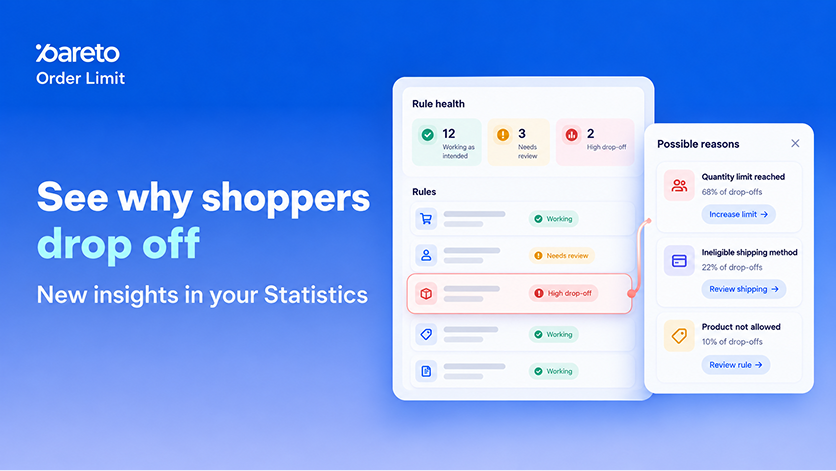
Seeing a rule marked as High Drop-off in your purchase control settings reveals a critical friction point: too many high-intent shoppers are hitting quantity or cart limits and abandoning their order entirely instead of adjusting their cart. Unclear error messaging, overly restrictive limits, or technical friction can cause shoppers to leave money on the table, turning necessary store rules into hidden revenue leaks.
Understanding why shoppers give up after being blocked is essential for optimizing purchase rules without sacrificing cart velocity. Pareto Order Limit’s updated Statistics Page equips merchants with a centralized Rule Health dashboard and diagnostic insights. With this release, you can pinpoint high-friction purchase limits, diagnose post-block shopper behavior, and resolve cart abandonment issues before peak peak shopping traffic arrives.
What’s New in Pareto Rule Health Statistics
The updated Pareto Statistics page introduces diagnostic reporting built around a 30-day rolling evaluation window. By tracking shopper behavior across product, cart, and checkout surfaces, store managers gain actionable visibility into how purchase restrictions directly impact order completion rates.
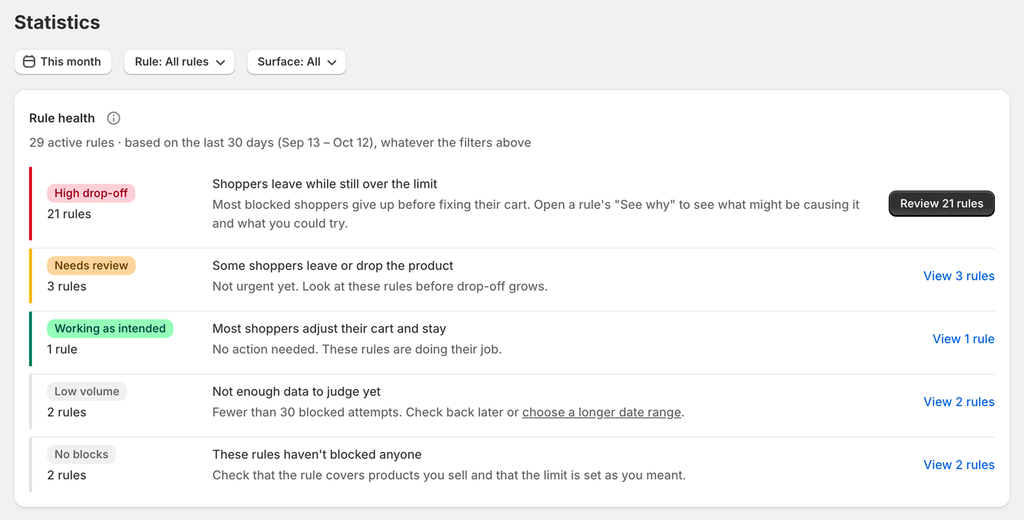
- Rule Health Summary Card: A high-level overview placed at the top of the Statistics page that categorizes all active rules over the last 30 days into five distinct operational statuses:
- High Drop-off: 40% or more of blocked shoppers leave the store with their cart over the limit.
- Needs Review: 20% to 39% of blocked shoppers leave, or 30% or more remove the limited product.
- Working as Intended: Most shoppers successfully adjust their cart to comply with limits and proceed to checkout.
- Low Volume: Fewer than 30 blocked attempts recorded within the selected period.
- No Blocks: 0 blocked attempts recorded, indicating rule limits may be set higher than typical cart quantities or do not cover active products.
- “See Why” Diagnostic Side Panel: On any rule marked as High Drop-off, clicking “See Why” opens a dedicated panel displaying key performance metrics alongside up to three ranked diagnostic root causes. These causes analyze actual shopper interaction data and rule configurations, offering evidence such as:
- Unclear limit messaging (indicated by high immediate retry counts).
- Stricter limits than expected by your average customer segment.
- Divergent behavior between guest and logged-in shoppers.
- Repeated automated retries without logging in (signaling potential reseller or bot activity).
- Recent spikes in friction levels.
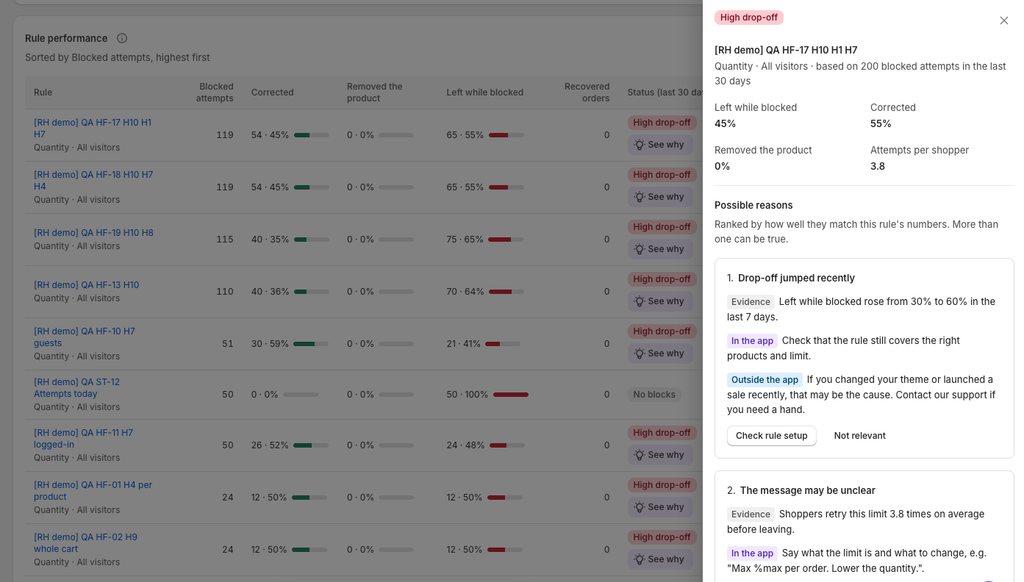
- Targeted Action Suggestions: Every diagnosed cause comes with a recommended action, such as adjusting rule limits, reviewing customer-facing text, or modifying buyer experience settings. Suggestions open the specific rule tab with a brief guidance note. The app never auto-modifies rules and will never suggest relaxing a limit if reseller or bot activity is detected.
- Post-Block Behavior Tracking: Breakdown of post-block actions categorized into three shopper outcomes:
- Corrected: Shopper adjusted cart contents to fit rule requirements.
- Removed the Product: Shopper deleted the restricted item from the cart.
- Left While Blocked: Shopper exited the store without resolving the block.
- Customer & Surface Segmentation: Granular reporting on shopper type (Guest vs. Logged-in) and blocking location (Product Page, Cart Page, and Checkout for Shopify Plus stores).
- Blocked Attempts by Day & Trend Overlay: A daily chart tracking corrected, blocked, and abandoned attempts against a dotted comparison line representing the previous period.
- Top Blocked Products & Top Repeated Attempts: Performance tables highlighting products triggered most frequently by rules and rules generating the highest repeat attempts per customer session.
Impact of Cart Limit Friction on Shopify Conversions
Purchase limits are essential for protecting inventory, managing order caps, and preventing wholesale reseller abuse. However, enforcing these rules without clear diagnostic visibility risks alienating legitimate retail customers during critical sales periods.
Maximize Peak Season Conversion Rates
Every abandoned cart represents lost revenue, especially during high-volume periods like Black Friday / Cyber Monday (BFCM). By identifying rules labeled High Drop-off or Needs Review, you can refine rule configurations before seasonal traffic surges, ensuring legitimate buyers adjust their carts rather than bouncing to a competitor.
Protect Inventory Without Driving Away Real Buyers
Automated inventory protection should never come at the expense of authentic customer experience. Pareto’s diagnostic panel isolates bot or reseller activity from regular retail friction, ensuring you only adjust limits when genuine shoppers are facing unnecessary barriers.
How to Audit and Fix High Drop-Off Rules
Reviewing rule health and optimizing purchase limits takes only a few minutes within your Pareto app dashboard.
- Access the Statistics Dashboard: Log into your Shopify Admin, open the Pareto application, and navigate to the Statistics tab.
- Filter by Rule Status: Review the Rule Health summary card at the top. Click on the High Drop-off status row to instantly filter your Rule Performance table to rules requiring immediate attention.
- Analyze Root Causes: Locate a flagged rule and click See why to open the diagnostic panel. Review the evidence, shopper retry trends, and surface metrics.
- Implement Suggested Action: Click the action button inside the panel to jump directly to the relevant rule setting, apply recommended adjustments, and save changes.
→ See more what’s new in your Statistic page
Optimize Your Store Before Peak Season
Prepare your inventory and purchase workflows before peak holiday traffic arrives. Review your Rule Health today to streamline customer checkout flows and capture maximum conversion value.