
New Integration: Add subscriptions in your discount offers
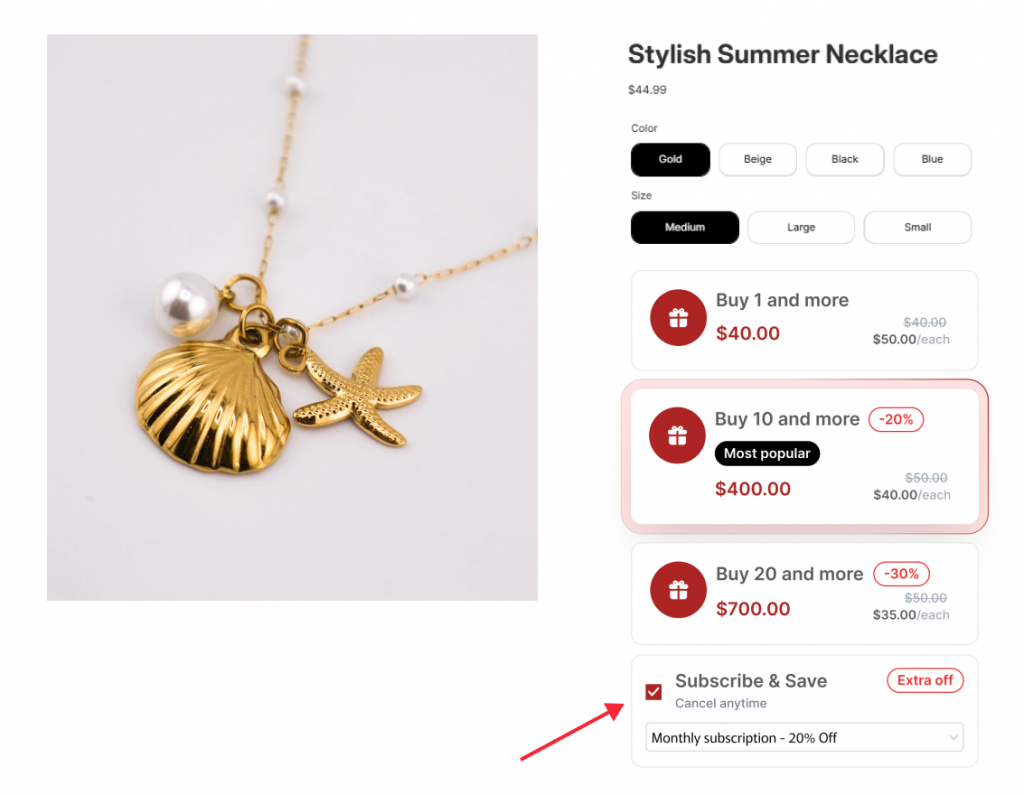
We are thrilled to announce a major upgrade to Pareto Quantity Breaks & Discounts: Native Subscription Integration. You can now display subscription options directly inside your quantity-break tiers, giving your customers the ultimate choice: save more by buying in bulk, or save even more by subscribing.
Turn one-time shoppers into lifelong subscribers. By integrating your subscription plans directly into your Pareto widget, you provide a seamless “Subscribe & Save” experience that increases LTV and recurring revenue without adding friction to the checkout process.
👉 Learn How to Enable Subscriptions
Why This Integration is a Game-Changer
In the past, tiered discounts and subscription widgets often lived in separate parts of the product page, creating a cluttered UI and confusing customers. This integration fixes that:
- Unified Widget Experience: Your “Subscribe & Save” option lives as a dedicated row inside the Pareto widget, creating a clean, professional look.
- Recurring Revenue on Autopilot: Encourage repeat deliveries by showing the clear savings of a subscription alongside your standard bulk offers.
- Compatible with the Best: We support any app using Shopify’s native Selling Plan API, including Recharge, Seal Subscriptions, Bold, and the Shopify Subscription App.
- Smart Widget Management: Tired of multiple widgets clashing? Use our “Hide third-party widget” feature to keep your product page sleek and distraction-free.
How the Discount “Stacking” Works
To ensure your margins remain protected, it’s important to understand the order in which discounts are applied:
- Subscription Discount: Applied first (as set in your subscription app).
- Quantity Break Discount: Applied next from Pareto.
- Other Shopify Discounts: Any additional codes or app discounts are applied last.
🛠️ 3 Steps to Set It Up
You can have subscriptions live in your widget in under two minutes:
- Navigate: Open your offer in Pareto and scroll to Display Settings.
- Enable: Find the Subscription section at the bottom and check “Enable subscription for this offer”.
- Customize: Set your Title (e.g., “Subscribe & Save More”), Subtitle (e.g., “Cancel anytime”), and Badge (e.g., “Extra 10% Off”). Adjust colors to match your brand and hit Save.
The subscription integration is available to all Pareto users! However, if you want full widget UI customization to perfectly match your custom theme, that is available exclusively on our Pro Plan.