
Pareto Quantity Breaks New Feature: Import Campaigns
Manually setting up tiered discounts for hundreds of products can feel like a full-time job. We know your time is better spent growing your brand than clicking through endless configuration screens.
That’s why we’re thrilled to announce Import Campaigns – the fastest way to create, scale, and migrate your discount strategy in Pareto Quantity Breaks.
From Hours to Seconds: Why Bulk Import?
Whether you’re launching a store-wide sale or migrating a complex discount structure from another app, the manual era is over. With Import Campaigns, you can bulk-create your offers using a simple CSV file.
What can you import?
- Quantity Breaks: Tiered rules (e.g., Buy 2+, 5+, or 10+) with multiple discount tiers.
- One Discount: Single-logic offers, including order-level discounts, cross-sells, and free shipping.
- Targeting Logic: Define exactly who sees your deals (All visitors, B2B, or specific customer tags) and where they appear (specific products, collections, or variants).
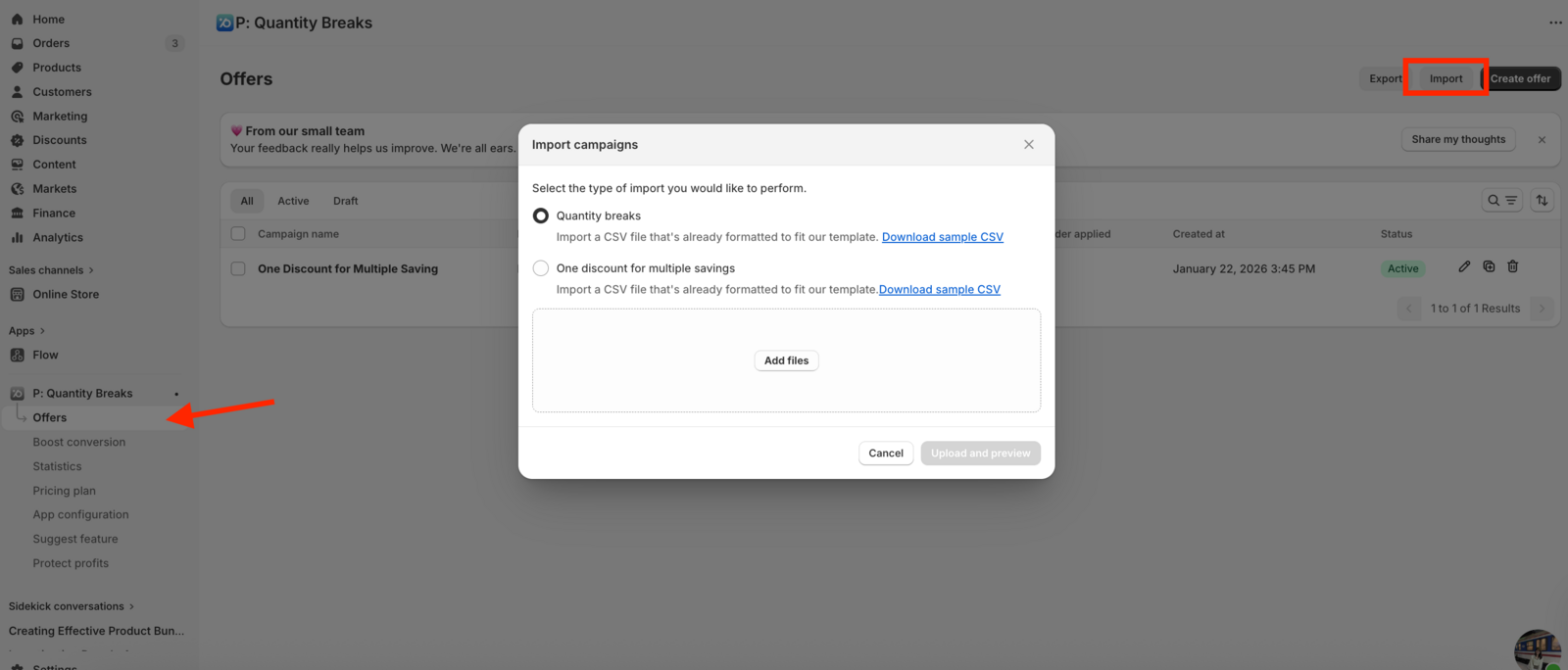
How it Works: 4 Steps to Scaling
We’ve designed the import flow to be as foolproof as possible. Here is how to get your campaigns live without the headache:
Choose Your Type: Select between “Quantity Breaks” or “One Discount” in the Pareto app.
Download the Template: We provide a sample CSV for each type.
Fill & Upload: Add your campaign names, product IDs, and discount values. Then, simply drag and drop your file into Pareto.
Preview & Activate: Review your rules in the app before they go live. All imported campaigns are created as Inactive by default, giving you a safety net to double-check everything before hitting the “Go” button.
👉 See how Import Campaigns works
💡 Pro-Tips for a Smooth Import
- The 100 Rule: You can import up to 100 rules at a time. If you have a massive catalog, simply break your CSV into small batches for the best performance.
- Numeric IDs only: Make sure your
product_ids,collection_ids, andvariant_idsare strictly numeric and comma-separated. - Stay in the Loop: Keep the app open while the progress bar is moving. It only takes a few minutes, but refreshing mid-way is like hitting “undo” on your hard work.
If you are migrating a massive number of offers from another store, need to import more than 100 rules at once, or have a complex custom setup, don’t sweat it.
Our support team is ready to handle the heavy lifting for you. Just ping us via live chat, and we’ll help you with a custom migration or an assisted import.