
New Feature: Pareto Order Limit now integrates with Shopify Flow
Running a store with strict purchase rules usually means one thing: more manual work for your team. Whether you’re limiting high-demand items or preventing B2B bulk-buying on D2C products, monitoring those limits can be a full-time job.
That changes today. We are thrilled to announce that Pareto Order Limit now officially integrates with Shopify Flow!
This integration moves Pareto Order Limit from a “blocking” tool to a fully automated “operations” engine. You can now connect your order limit rules to thousands of other apps and actions across your store.
⚡ What Can You Do with Pareto + Shopify Flow?
The possibilities are nearly endless, but here are the top workflows our early testers are already using:
- Smart Customer Tagging: Automatically add a tag like
LimitViolatedto a customer profile when they try to bypass your rules, helping you identify “risky” shoppers for future campaigns. - Instant Team Alerts: Send a Slack, Email, or SMS notification to your fulfillment team the second a cart limit is violated so they can keep an eye on incoming orders.
- Marketing Segmentation: Trigger an event in Klaviyo or Omnisend when a limit is hit. (e.g., If a customer tries to buy 50+ items, add them to a “Wholesale Lead” list for your sales team to reach out to).
- Auto-Cleanup: Automatically archive or cancel orders that managed to bypass a limit, ensuring your inventory stays protected without a human ever having to click a button.
How It Works: The Two New Triggers
We’ve introduced two specific triggers you can use to start any workflow:
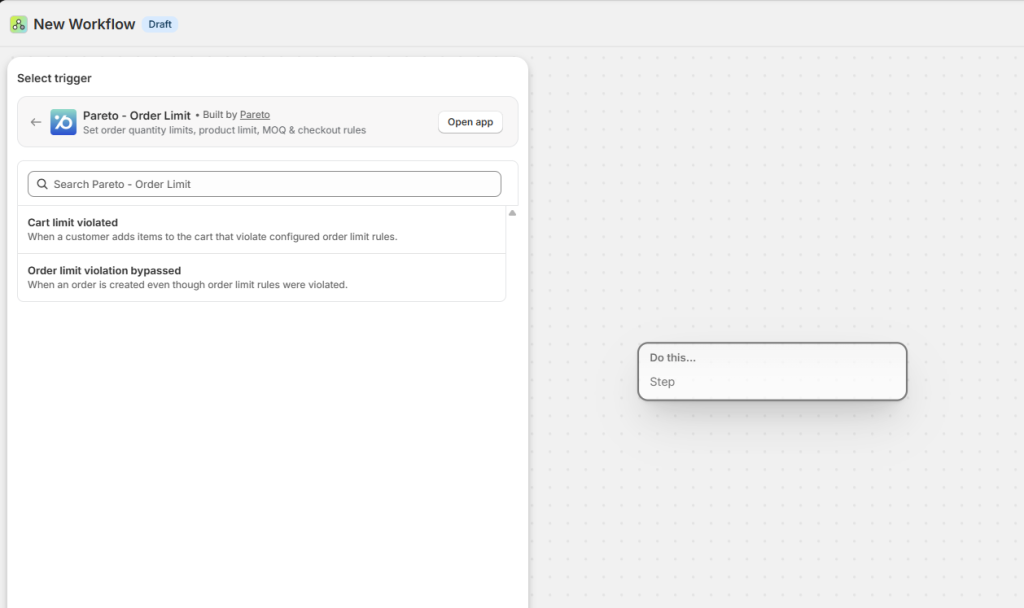
- Cart Limit Violated: Fires the moment a customer adds items to their cart that break your rules. Perfect for early alerts and tagging.
- Order Limit Violation Bypassed: Fires if an order is successfully created despite a rule violation. This is your “safety net” for high-risk order management.
Get Started in 3 Simple Steps
You don’t need to be a developer to set this up. If you have Shopify Flow installed, you’re ready to go:
1. Create Your Trigger
In Shopify Flow, create a new workflow and search for Pareto Order Limit. Choose between the “Cart” or “Order” violation triggers.
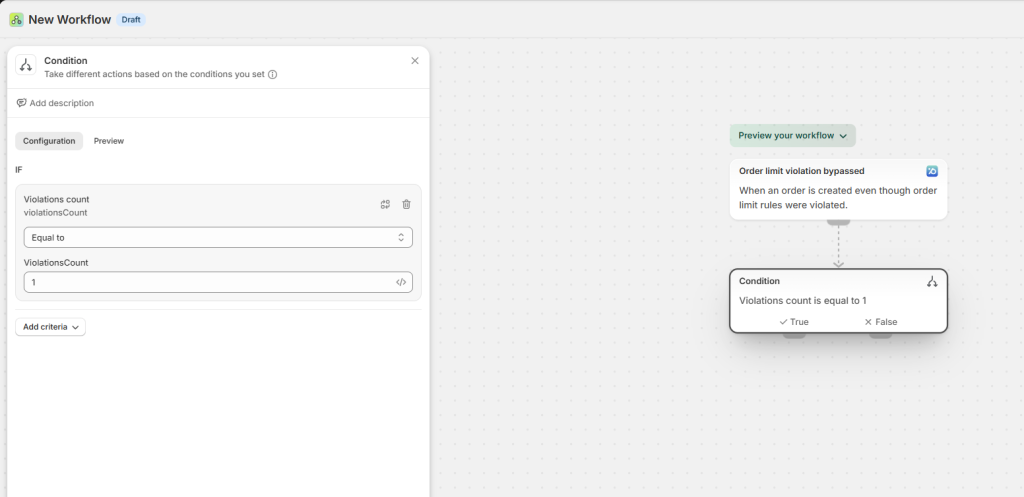
2. Add Your Logic (Optional)
Want the flow to run only for specific rules? You can set a condition to check if the Rule Name contains a specific word or if the Violation Count is above a certain number.
3. Choose Your Action
Decide what happens next. Tag the order, send a Slack message, or update a customer record. Once you’re happy, hit Turn On.
The Pareto + Shopify Flow integration is designed to give you peace of mind. Let the app handle the enforcement, and let Flow handle the paperwork.
Need a template to get started? If you’d like a sample workflow template or need advice on the best logic for your specific store policy, our support team is standing by. Reach out via live chat – we’re happy to help you build the perfect automation!